<?xml version="1.0" encoding="utf-8"?><feed xmlns="http://www.w3.org/2005/Atom" ><generator uri="https://jekyllrb.com/" version="3.10.0">Jekyll</generator><link href="https://yjung93.github.io/feed.xml" rel="self" type="application/atom+xml" /><link href="https://yjung93.github.io/" rel="alternate" type="text/html" /><updated>2026-04-03T13:46:10+00:00</updated><id>https://yjung93.github.io/feed.xml</id><title type="html">Jake’s Technical Note</title><subtitle>Write an awesome description for your new site here. You can edit this line in _config.yml. It will appear in your document head meta (for Google search results) and in your feed.xml site description.</subtitle><author><name>Jake Yoo</name></author><entry><title type="html">Asynchronous Completion Token</title><link href="https://yjung93.github.io/design%20pattern%20-%20ace%20framework/post-asynchronous_completion_token/" rel="alternate" type="text/html" title="Asynchronous Completion Token" /><published>2026-01-25T00:00:00+00:00</published><updated>2026-01-25T00:00:00+00:00</updated><id>https://yjung93.github.io/design%20pattern%20-%20ace%20framework/post-asynchronous_completion_token</id><content type="html" xml:base="https://yjung93.github.io/design%20pattern%20-%20ace%20framework/post-asynchronous_completion_token/"><![CDATA[<p><strong>Table of Contents</strong></p>
<ul>
  <li><a href="#overview">Overview</a></li>
  <li><a href="#asynchronous-completion-token-act-pattern-posa2">Asynchronous Completion Token (ACT) pattern [POSA2]</a>
    <ul>
      <li><a href="#background">Background</a></li>
      <li><a href="#solution">Solution</a></li>
      <li><a href="#structure">Structure</a>
        <ul>
          <li><a href="#class-diagram">Class diagram</a></li>
          <li><a href="#dynamic">Dynamic</a></li>
        </ul>
      </li>
    </ul>
  </li>
  <li><a href="#simplified-version-of-implementation">Simplified version of Implementation</a>
    <ul>
      <li><a href="#design-choices">Design Choices</a></li>
      <li><a href="#component-mapping">Component Mapping</a></li>
      <li><a href="#framework-layer">Framework Layer</a></li>
      <li><a href="#application-layer">Application Layer</a></li>
      <li><a href="#class-diagram-1">Class diagram</a></li>
      <li><a href="#sequence-diagram">Sequence diagram</a></li>
      <li><a href="#directory-and-file-structure">Directory and file structure</a></li>
    </ul>
  </li>
</ul>

<h2 id="overview">Overview</h2>

<p>This post covers the following topics:</p>
<ul>
  <li>The <strong>Asynchronous Completion Token pattern</strong>  for efficiently managing state in asynchronous operations.</li>
  <li>A <strong>simplified</strong> implementation inspired by the <a href="https://www.dre.vanderbilt.edu/~schmidt/ACE.html">Adaptive Communication Environment (ACE)</a>. The source code is available at <a href="https://github.com/yjung93/study_ACE_design_pattern">https://github.com/yjung93/study_ACE_design_pattern</a></li>
</ul>

<h2 id="asynchronous-completion-token-act-pattern-posa2">Asynchronous Completion Token (ACT) pattern [<a href="/references/post-references">POSA2</a>]</h2>

<p>The <strong>Asynchronous Completion Token (ACT)</strong> also known as <em>Active Demultiplexing</em>, lets an application efficiently demultiplex and process the results of asynchronous operations that the application initiated.</p>

<h3 id="background">Background</h3>
<p>In a multi-threaded system, a client application may invoke operations on services and later receive the results asynchronously via completion events. When a completion event arrives, the client is responsible for demultiplexing it to the correct completion handler so the result can be processed.</p>

<p>To handle this efficiently, three factors matter:</p>
<ul>
  <li><strong>No direct dependency on client state</strong>: The service should not need to understand the client’s original context (and often cannot, because the client continues doing other work after initiating the operation).</li>
  <li><strong>Low communication overhead</strong>: Avoid extra round trips or side channels just to figure out how the client should process a completion.</li>
  <li><strong>Fast demultiplexing on completion</strong>: When the completion event arrives, the client should be able to quickly route it to the correct handler.</li>
</ul>

<h3 id="solution">Solution</h3>
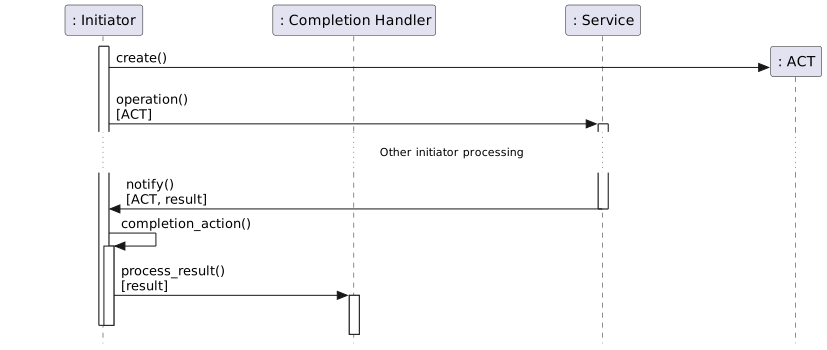
<p>Whenever a client (the <em>initiator</em>) invokes an asynchronous operation on a service, it sends extra information describing how to handle the service’s response. When the operation completes, that information is returned unchanged, enabling the initiator to demultiplex and process the response efficiently.</p>

<p>In Detail:</p>
<ol>
  <li>A client creates an <code class="language-plaintext highlighter-rouge">Asynchronous Completion Token (ACT)</code> when it invokes an asynchronous operation on a service.<br />
  The ACT contains information that uniquely identifies the completion handler responsible for processing the operation’s response.</li>
  <li>The ACT is passed to the service along with the operation request.</li>
  <li>The service keeps the ACT without modifying it.</li>
  <li>When the operation completes, the service responds to the initiator and includes the original ACT.</li>
  <li>The initiator uses the ACT to identify the correct completion handler and process the response.</li>
</ol>

<h3 id="structure">Structure</h3>
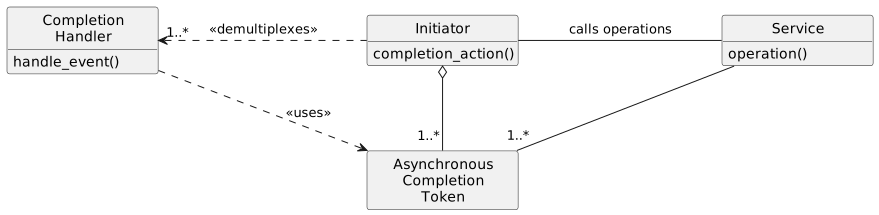
<p>The Asynchronous Completion Token pattern has four participants:</p>
<ul>
  <li><strong>Service</strong>: Provides functionality and processes requests asynchronously.</li>
  <li><strong>Initiator</strong>: Invokes operations on a service asynchronously and demultiplexes the service response to the appropriate handler.</li>
  <li><strong>Completion Handler</strong>: A function or object that processes the result of a completed asynchronous operation.</li>
  <li><strong>Asynchronous Completion Token (ACT)</strong>: Contains information that identifies an initiator’s completion handler. It is passed to the service when the initiator requests an asynchronous operation and is returned unchanged when the operation completes, enabling efficient demultiplexing.</li>
</ul>

<h4 id="class-diagram">Class diagram</h4>

<!-- [AI Note]: The diagram below is generated from /_files/uml/plantUml/asynchronous_completion_token_pattern_class_diagram.puml -->
<p><img src="/assets/images/uml/plantUml/asynchronous_completion_token_pattern_class_diagram.svg" alt="Reactor PlantUML Diagram" width="100%" /></p>

<h4 id="dynamic">Dynamic</h4>

<!-- [AI Note]: The diagram below is generated from /_files/uml/plantUml/asynchronous_completion_token_pattern_dynamic.puml -->
<p><img src="/assets/images/uml/plantUml/asynchronous_completion_token_pattern_dynamic.svg" alt="Reactor PlantUML Diagram" width="100%" /></p>

<h2 id="simplified-version-of-implementation">Simplified version of Implementation</h2>

<h3 id="design-choices">Design Choices</h3>
<p>This version keeps the core architectural ideas from ACE while intentionally skipping production-level complexity. For example, unlike the full ACE implementation which applied Factory and Bridge design patterns to support multiple platforms, this version supports only the POSIX platform and omits all Factory-related structures.</p>

<p>The participants of ACT in this post are implemented as part of a simplified <strong>Proactor</strong> framework, which is covered in <a href="/design%20pattern%20-%20ace%20framework/post-proactor/">Proactor framework</a>.</p>

<p>The following framework is used as infrastructure for this implementation:</p>
<ul>
  <li><a href="/design%20pattern%20-%20ace%20framework/post-reactor/">Reactor framework</a></li>
</ul>

<p>The source code is available at <a href="https://github.com/yjung93/study_ACE_design_pattern">https://github.com/yjung93/study_ACE_design_pattern</a></p>

<h3 id="component-mapping">Component Mapping</h3>
<p>To implement this pattern, I mapped the ACT pattern components to the following C++ classes and associated OS kernel services:</p>

<table>
  <thead>
    <tr>
      <th style="text-align: left">Pattern Role</th>
      <th style="text-align: left">Implementation class / OS kernel service</th>
    </tr>
  </thead>
  <tbody>
    <tr>
      <td style="text-align: left"><strong>Service</strong></td>
      <td style="text-align: left"><code class="language-plaintext highlighter-rouge">POSIX.4 Asynchronous I/O</code></td>
    </tr>
    <tr>
      <td style="text-align: left"><strong>Initiator</strong></td>
      <td style="text-align: left"><code class="language-plaintext highlighter-rouge">AsynchReadStream / AsynchWriteStream</code></td>
    </tr>
    <tr>
      <td style="text-align: left"><strong>Completion Handler</strong></td>
      <td style="text-align: left"><code class="language-plaintext highlighter-rouge">Handler/ServiceHandler</code></td>
    </tr>
    <tr>
      <td style="text-align: left"><strong>Asynchronous Completion Token (ACT)</strong></td>
      <td style="text-align: left"><code class="language-plaintext highlighter-rouge">AsynchResult</code></td>
    </tr>
  </tbody>
</table>

<h3 id="framework-layer">Framework Layer</h3>

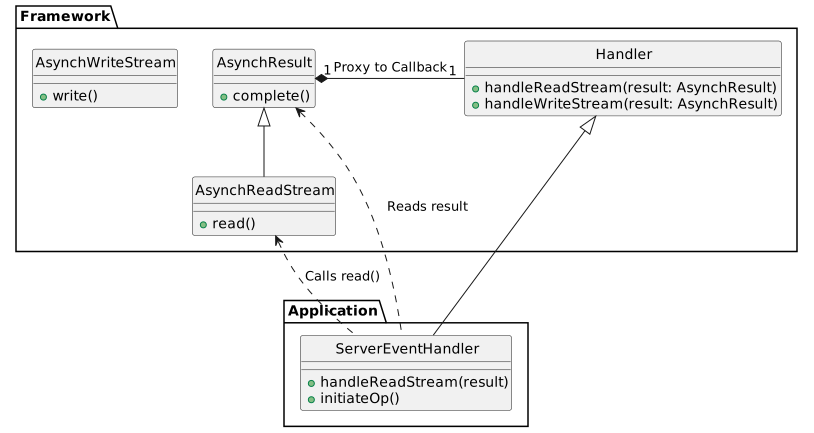
<p>The core components of ACT in the Proactor framework are:</p>

<ul>
  <li><strong>Handler</strong>: An abstract base class for application-defined completion event handlers. It defines virtual methods like <code class="language-plaintext highlighter-rouge">handleReadStream</code> and <code class="language-plaintext highlighter-rouge">handleWriteStream</code> to process operation completions.</li>
  <li><strong>ServiceHandler</strong>: Extends <code class="language-plaintext highlighter-rouge">Handler</code> to support connection initialization (<code class="language-plaintext highlighter-rouge">open</code>).</li>
  <li><strong>AsynchResult</strong>: Represents the result of an asynchronous operation. It contains the status, bytes transferred, and acts as a carrier for the completion callback to the <code class="language-plaintext highlighter-rouge">Handler</code>.</li>
  <li><strong>AsynchReadStream / AsynchWriteStream</strong>: Factory classes used by applications to initiate asynchronous read and write operations. They register each request with the <code class="language-plaintext highlighter-rouge">Proactor</code>.</li>
</ul>

<h3 id="application-layer">Application Layer</h3>

<p>The example application demonstrates a hybrid approach where:</p>
<ul>
  <li><strong>Acceptor</strong>: Uses the <strong>Reactor</strong> pattern to synchronously listen for and accept new TCP connections. Upon acceptance, it creates a <code class="language-plaintext highlighter-rouge">ServerEventHandler</code> and hands over the new socket to the Proactor framework.</li>
  <li><strong>ServerEventHandler</strong>: A concrete <code class="language-plaintext highlighter-rouge">ServiceHandler</code> that manages the lifecycle of a client connection. It initiates asynchronous reads and writes using <code class="language-plaintext highlighter-rouge">AsynchReadStream</code> and <code class="language-plaintext highlighter-rouge">AsynchWriteStream</code>.</li>
</ul>

<h3 id="class-diagram-1">Class diagram</h3>

<p>The following diagram illustrates the relationship between the participants of the Asynchronous Completion Token pattern and the application classes.
This diagram focuses on the classes involved in transporting the Asynchronous Completion Token.</p>

<!-- [AI Note]: The diagram below is generated from /_files/uml/plantUml/asynchronous_completion_token_simplifed_impl_class_diagram.puml -->
<p><img src="/assets/images/uml/plantUml/asynchronous_completion_token_simplifed_impl_class_diagram.svg" alt="Reactor PlantUML Diagram" width="80%" /></p>

<h3 id="sequence-diagram">Sequence diagram</h3>

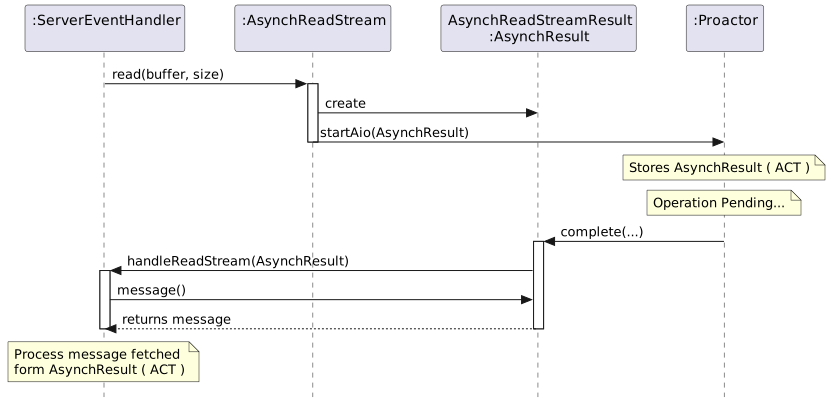
<p>The sequence below illustrates the lifecycle of the ACT: from passing it during initiation to retrieving it during completion.</p>

<!-- [AI Note]: The diagram below is generated from /_files/uml/plantUml/asynchronous_completion_token_simplifed_impl_dynamic.puml -->
<p><img src="/assets/images/uml/plantUml/asynchronous_completion_token_simplifed_impl_dynamic.svg" alt="Reactor PlantUML Diagram" width="100%" /></p>

<h3 id="directory-and-file-structure">Directory and file structure</h3>
<p>Related source files:</p>

<div class="language-bash highlighter-rouge"><div class="highlight"><pre class="highlight"><code>├── applications
│   ├── example_proactor
│   │   ├── Acceptor.cpp
│   │   ├── Acceptor.hpp
│   │   ├── MainClient.cpp
│   │   ├── MainServer.cpp
│   │   ├── ServerEventHandler.cpp
│   │   └── ServerEventHandler.hpp
├── framework
│   ├── proactor
│   │   └── 1_0
│   │       ├── AsynchPseudoTask.cpp
│   │       ├── AsynchPseudoTask.hpp
│   │       ├── AsynchReadStream.cpp
│   │       ├── AsynchReadStream.hpp
│   │       ├── AsynchResult.cpp
│   │       ├── AsynchResult.hpp
│   │       ├── AsynchWriteStream.cpp
│   │       ├── AsynchWriteStream.hpp
│   │       ├── Handler.cpp
│   │       ├── Handler.hpp
│   │       ├── NotifyPipeManager.cpp
│   │       ├── NotifyPipeManager.hpp
│   │       ├── Proactor.cpp
│   │       ├── Proactor.hpp
│   │       ├── ServiceHandler.cpp
│   │       └── ServiceHandler.hpp
</code></pre></div></div>]]></content><author><name>Jake Yoo</name></author><category term="Design Pattern - ACE Framework" /><category term="Asynchronous Completion Token" /><summary type="html"><![CDATA[Table of Contents Overview Asynchronous Completion Token (ACT) pattern [POSA2] Background Solution Structure Class diagram Dynamic Simplified version of Implementation Design Choices Component Mapping Framework Layer Application Layer Class diagram Sequence diagram Directory and file structure]]></summary></entry><entry><title type="html">Proactor Pattern</title><link href="https://yjung93.github.io/design%20pattern%20-%20ace%20framework/post-proactor/" rel="alternate" type="text/html" title="Proactor Pattern" /><published>2026-01-24T00:00:00+00:00</published><updated>2026-01-24T00:00:00+00:00</updated><id>https://yjung93.github.io/design%20pattern%20-%20ace%20framework/post-proactor</id><content type="html" xml:base="https://yjung93.github.io/design%20pattern%20-%20ace%20framework/post-proactor/"><![CDATA[<p><strong>Table of Contents</strong></p>
<ul>
  <li><a href="#overview">Overview</a></li>
  <li><a href="#proactor-pattern-posa2">Proactor pattern [POSA2]</a>
    <ul>
      <li><a href="#background">Background</a></li>
      <li><a href="#solution">Solution</a></li>
      <li><a href="#structure">Structure</a>
        <ul>
          <li><a href="#class-diagram">Class diagram</a></li>
          <li><a href="#dynamic">Dynamic</a></li>
        </ul>
      </li>
    </ul>
  </li>
  <li><a href="#simplified-version-of-implementation">Simplified version of Implementation</a>
    <ul>
      <li><a href="#design-choices">Design Choices</a></li>
      <li><a href="#component-mapping">Component Mapping</a></li>
      <li><a href="#framework-layer">Framework Layer</a></li>
      <li><a href="#application-layer">Application Layer</a></li>
      <li><a href="#class-diagram-1">Class diagram</a></li>
      <li><a href="#sequence-diagram">Sequence diagram</a></li>
      <li><a href="#directory-and-file-structure">Directory and file structure</a></li>
    </ul>
  </li>
</ul>

<h2 id="overview">Overview</h2>

<p>This post covers the following topics:</p>
<ul>
  <li>The <strong>Proactor pattern</strong>  for demultiplexing and dispatching events triggered by asynchronous I/O completion.</li>
  <li>A <strong>simplified</strong> implementation inspired by the <a href="https://www.dre.vanderbilt.edu/~schmidt/ACE.html">Adaptive Communication Environment (ACE)</a>. The source code is available at <a href="https://github.com/yjung93/study_ACE_design_pattern">https://github.com/yjung93/study_ACE_design_pattern</a></li>
</ul>

<h2 id="proactor-pattern-posa2">Proactor pattern [<a href="/references/post-references">POSA2</a>]</h2>

<p>The <strong>Proactor pattern</strong> provides an event-driven framework for efficiently handling the initiation of asynchronous operations—which are potentially long-duration—and processing their completion. It offers the performance benefits of concurrency without the complexity downsides often associated with concurrent application design.</p>

<h3 id="background">Background</h3>
<p>The performance of event-driven applications, particularly server applications in distributed systems, can be improved when requests are processed asynchronously instead of using synchronous I/O APIs that block the thread.
When processing requests asynchronously, the triggered completion event must be demultiplexed and dispatched to the appropriate component for handling.</p>

<p>To make this approach effective, the following requirements must be met:</p>
<ul>
  <li>Process multiple completion events in parallel without allowing long-duration processes to block others.</li>
  <li>Maximize throughput by avoiding unnecessary context switching, synchronization overhead, and data movement across CPUs.</li>
  <li>Allow new or improved services to integrate with existing event demultiplexing/dispatching mechanisms with minimal effort.</li>
  <li>Keep application code largely insulated from multi-threading and synchronization complexity.</li>
</ul>

<h3 id="solution">Solution</h3>
<ul>
  <li>Split the application into two parts:
    <ul>
      <li><strong>Long duration operation</strong>: Executes the long-duration operation asynchronously.</li>
      <li><strong>Completion handlers</strong>: Processes the result of the operation when completed.</li>
    </ul>
  </li>
  <li>Integrate demultiplexing of the completion event with dispatching events to the corresponding component’s completion event handler.</li>
  <li>Decouple demultiplexing and dispatching operations from the application-specific completion handling implementation.</li>
</ul>

<h3 id="structure">Structure</h3>

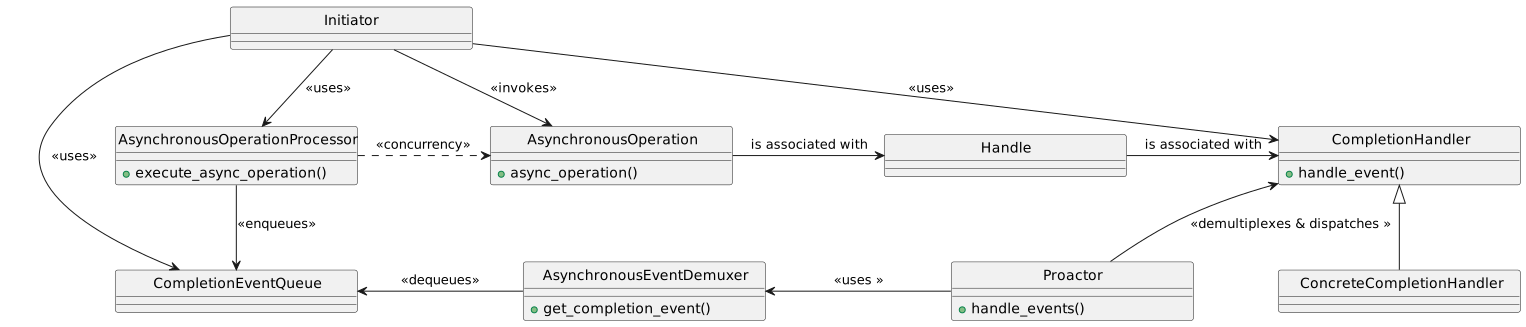
<p>The Proactor pattern consists of the following participants:</p>
<ul>
  <li><strong>Handle</strong>: Identifies entities such as network connections or open files. It is provided by the Operating System.</li>
  <li><strong>Asynchronous Operations</strong>: Operations used by the application. These are typically long-duration operations, such as reading/writing data asynchronously via a socket.</li>
  <li><strong>Completion Handler</strong>: An interface that provides a completion method hook associated with an asynchronous operation. The application implements a concrete handler to define application-specific completion logic.</li>
  <li><strong>Concrete Completion Handlers</strong>: Specializes the Completion Handler.</li>
  <li><strong>Asynchronous Operation Processor</strong>: Invokes asynchronous operations, which are often provided by the OS kernel. Upon operation completion, a completion event is triggered and dispatched to the corresponding completion handler.</li>
  <li><strong>Completion Event Queue</strong>: The completion event is inserted into this queue and waits until it is demultiplexed and dispatched to the corresponding completion handler.</li>
  <li><strong>Asynchronous Event Demultiplexer</strong>: Waits for completed events to be inserted into the completion event queue, then returns them to the caller and removes them from the queue.</li>
  <li><strong>Proactor</strong>: Provides an event loop for waiting and fetching events from the asynchronous event demultiplexer. Once a completion event is fetched, it dispatches the event to the corresponding completion handler’s event hook method.</li>
  <li><strong>Initiator</strong>: An entity within the application that invokes asynchronous operations and often acts as a completion handler.</li>
</ul>

<h4 id="class-diagram">Class diagram</h4>

<!-- [AI Note]: The diagram below is generated from /_files/uml/plantUml/proactor_pattern_class_diagram.puml -->
<p><img src="/assets/images/uml/plantUml/proactor_pattern_class_diagram.svg" alt="Reactor PlantUML Diagram" width="100%" /></p>

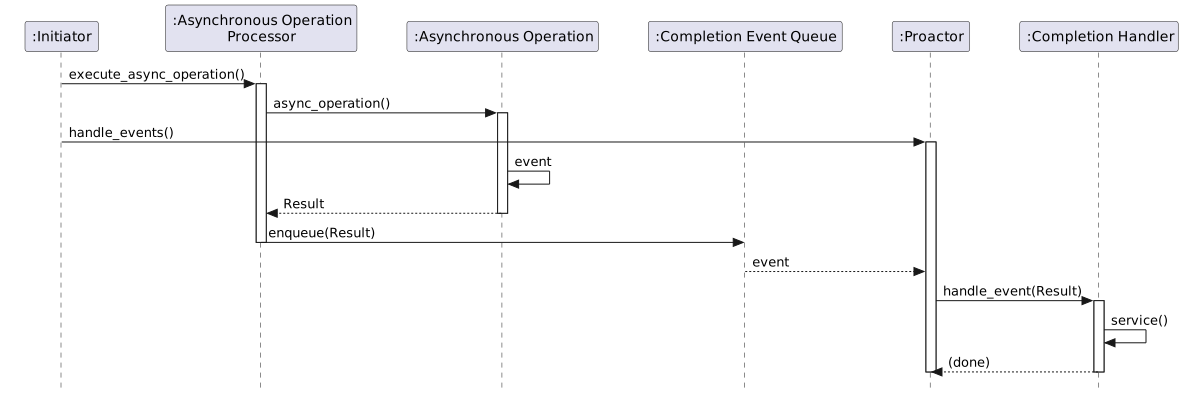
<h4 id="dynamic">Dynamic</h4>

<!-- [AI Note]: The diagram below is generated from /_files/uml/plantUml/proactor_pattern_dynamic.puml -->
<p><img src="/assets/images/uml/plantUml/proactor_pattern_dynamic.svg" alt="Reactor PlantUML Diagram" width="100%" /></p>

<h2 id="simplified-version-of-implementation">Simplified version of Implementation</h2>

<h3 id="design-choices">Design Choices</h3>
<p>This version keeps the core architectural ideas from ACE while intentionally skipping production-level complexity. For example, unlike the full ACE implementation which applied Factory and Bridge design patterns to support multiple platforms, this version supports only the POSIX platform and omits all Factory-related structures.</p>

<p>The following frameworks are used as infrastructure for this implementation:</p>
<ul>
  <li><a href="/design%20pattern%20-%20ace%20framework/post-reactor/">Reactor framework</a></li>
</ul>

<p>The source code is available at <a href="https://github.com/yjung93/study_ACE_design_pattern">https://github.com/yjung93/study_ACE_design_pattern</a></p>

<h3 id="component-mapping">Component Mapping</h3>
<p>To implement this pattern, I mapped the Proactor pattern components to the following C++ classes and associated OS kernel services:</p>

<table>
  <thead>
    <tr>
      <th style="text-align: left">Pattern Role</th>
      <th style="text-align: left">Implementation Class/OS Kernel service</th>
    </tr>
  </thead>
  <tbody>
    <tr>
      <td style="text-align: left"><strong>Handle</strong></td>
      <td style="text-align: left"><code class="language-plaintext highlighter-rouge">I/O file descriptor</code></td>
    </tr>
    <tr>
      <td style="text-align: left"><strong>Asynchronous Operations</strong></td>
      <td style="text-align: left"><code class="language-plaintext highlighter-rouge">POSIX.4 Asynchronous I/O</code></td>
    </tr>
    <tr>
      <td style="text-align: left"><strong>Completion Handler</strong></td>
      <td style="text-align: left"><code class="language-plaintext highlighter-rouge">Handler/ServiceHandler</code></td>
    </tr>
    <tr>
      <td style="text-align: left"><strong>Concrete Completion Handlers</strong></td>
      <td style="text-align: left"><code class="language-plaintext highlighter-rouge">ServerEventHandler</code></td>
    </tr>
    <tr>
      <td style="text-align: left"><strong>Asynchronous Operation Processor</strong></td>
      <td style="text-align: left"><code class="language-plaintext highlighter-rouge">POSIX.4 Asynchronous I/O</code></td>
    </tr>
    <tr>
      <td style="text-align: left"><strong>Completion Event Queue</strong></td>
      <td style="text-align: left"><code class="language-plaintext highlighter-rouge">POSIX.4 Asynchronous I/O</code></td>
    </tr>
    <tr>
      <td style="text-align: left"><strong>Asynchronous Event Demultiplexer</strong></td>
      <td style="text-align: left"><code class="language-plaintext highlighter-rouge">POSIX.4 Asynchronous I/O</code></td>
    </tr>
    <tr>
      <td style="text-align: left"><strong>Proactor</strong></td>
      <td style="text-align: left"><code class="language-plaintext highlighter-rouge">Proactor</code></td>
    </tr>
    <tr>
      <td style="text-align: left"><strong>Initiator</strong></td>
      <td style="text-align: left"><code class="language-plaintext highlighter-rouge">AsynchReadStream/AsynchWriteStream</code></td>
    </tr>
  </tbody>
</table>

<h3 id="framework-layer">Framework Layer</h3>

<p>The Core components of the Proactor framework are:</p>

<ul>
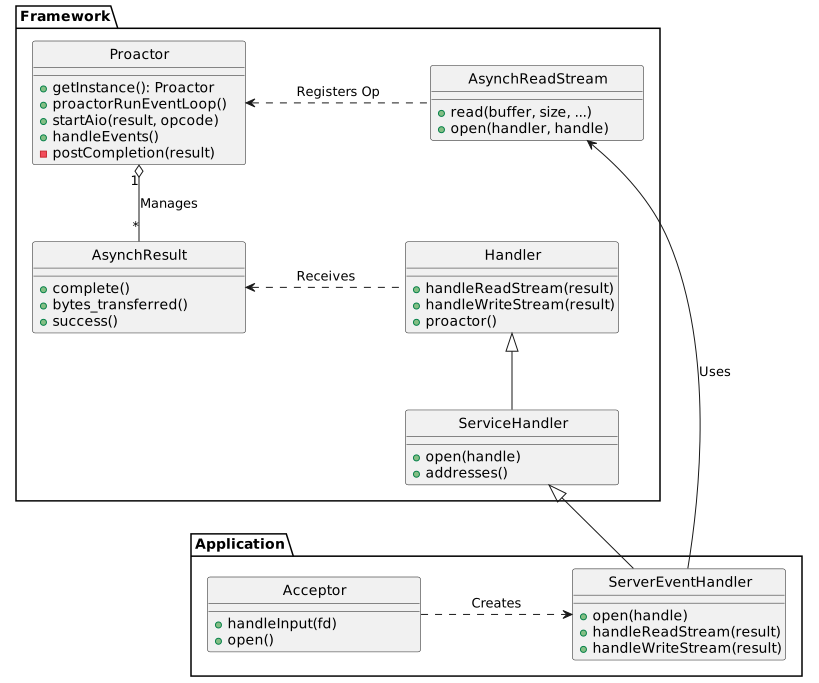
  <li><strong>Proactor</strong>: The singleton component that manages the event loop (<code class="language-plaintext highlighter-rouge">proactorRunEventLoop</code>). It processes asynchronous operations, handles completion events, and dispatches them to the appropriate handlers.</li>
  <li><strong>Handler</strong>: An abstract base class for application-defined event handlers. It defines virtual methods like <code class="language-plaintext highlighter-rouge">handleReadStream</code> and <code class="language-plaintext highlighter-rouge">handleWriteStream</code> to process operation completions.</li>
  <li><strong>ServiceHandler</strong>: Extends <code class="language-plaintext highlighter-rouge">Handler</code> to support connection initialization (<code class="language-plaintext highlighter-rouge">open</code>).</li>
  <li><strong>AsynchResult</strong>: Represents the result of an asynchronous operation. It contains the status, bytes transferred, and acts as a carrier for the completion callback to the <code class="language-plaintext highlighter-rouge">Handler</code>.</li>
  <li><strong>AsynchReadStream / AsynchWriteStream</strong>: Factory classes used by applications to initiate asynchronous read and write operations. They register the request with the <code class="language-plaintext highlighter-rouge">Proactor</code>.</li>
  <li>
    <h3 id="application-layer">Application Layer</h3>
  </li>
</ul>

<p>The example application demonstrates a hybrid approach ( Reactor along with Proactor) where:</p>
<ul>
  <li><strong>Acceptor</strong>: Uses the <strong>Reactor</strong> pattern to synchronously listen for and accept new TCP connections. Upon acceptance, it creates a <code class="language-plaintext highlighter-rouge">ServerEventHandler</code> and hands over the new socket to the Proactor framework.</li>
  <li><strong>ServerEventHandler</strong>: A concrete <code class="language-plaintext highlighter-rouge">ServiceHandler</code> that manages the lifecycle of a client connection. It initiates asynchronous reads and writes using <code class="language-plaintext highlighter-rouge">AsynchReadStream</code> and <code class="language-plaintext highlighter-rouge">AsynchWriteStream</code>.</li>
</ul>

<h3 id="class-diagram-1">Class diagram</h3>

<p>The following diagram illustrates the relationship between the Proactor framework classes and the application classes.</p>

<!-- [AI Note]: The diagram below is generated from /_files/uml/plantUml/proactor_pattern_simplified_imp_class_diagram.puml -->
<p><img src="/assets/images/uml/plantUml/proactor_pattern_simplified_imp_class_diagram.svg" alt="Reactor PlantUML Diagram" width="100%" /></p>

<h3 id="sequence-diagram">Sequence diagram</h3>

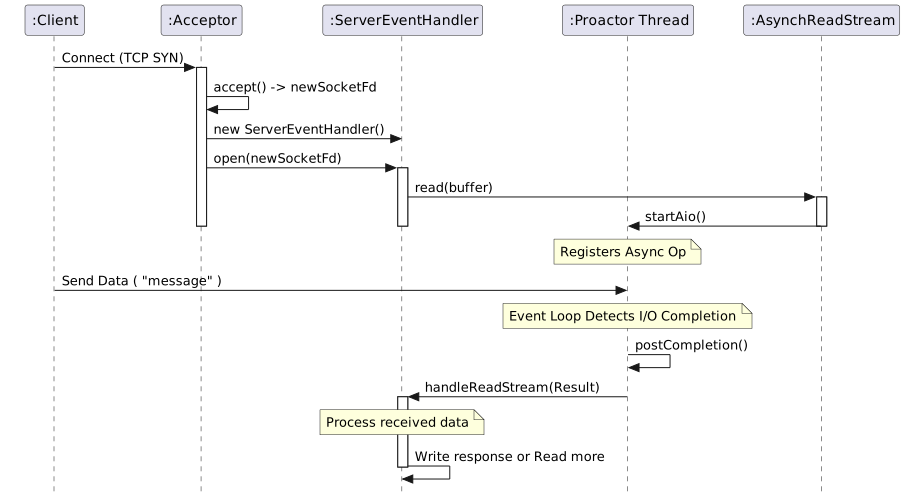
<ul>
  <li>The sequence below depicts the flow of a new client connection and process of received data</li>
</ul>

<!-- [AI Note]: The diagram below is generated from /_files/uml/plantUml/proactor_pattern_simplified_imp_1_dynamic.puml -->
<p><img src="/assets/images/uml/plantUml/proactor_pattern_simplified_imp_1_dynamic.svg" alt="Reactor PlantUML Diagram" width="100%" /></p>

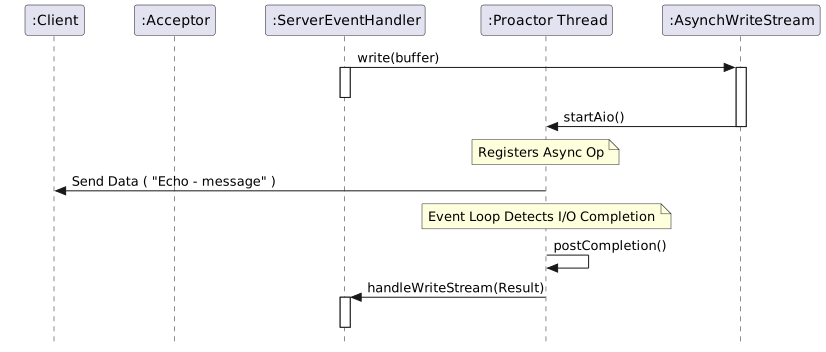
<ul>
  <li>The sequence below continues from the diagram above, where ServerEventHandler writes response data to the client.</li>
</ul>

<!-- [AI Note]: The diagram below is generated from /_files/uml/plantUml/proactor_pattern_simplified_imp_2_dynamic.puml -->
<p><img src="/assets/images/uml/plantUml/proactor_pattern_simplified_imp_2_dynamic.svg" alt="Reactor PlantUML Diagram" width="100%" /></p>

<h3 id="directory-and-file-structure">Directory and file structure</h3>
<p>Related source files:</p>

<div class="language-bash highlighter-rouge"><div class="highlight"><pre class="highlight"><code>
├── applications
│   ├── example_proactor
│   │   ├── Acceptor.cpp
│   │   ├── Acceptor.hpp
│   │   ├── MainClient.cpp
│   │   ├── MainServer.cpp
│   │   ├── ServerEventHandler.cpp
│   │   └── ServerEventHandler.hpp
├── framework
│   ├── proactor
│   │   └── 1_0
│   │       ├── AsynchPseudoTask.cpp
│   │       ├── AsynchPseudoTask.hpp
│   │       ├── AsynchReadStream.cpp
│   │       ├── AsynchReadStream.hpp
│   │       ├── AsynchResult.cpp
│   │       ├── AsynchResult.hpp
│   │       ├── AsynchWriteStream.cpp
│   │       ├── AsynchWriteStream.hpp
│   │       ├── Handler.cpp
│   │       ├── Handler.hpp
│   │       ├── NotifyPipeManager.cpp
│   │       ├── NotifyPipeManager.hpp
│   │       ├── Proactor.cpp
│   │       ├── Proactor.hpp
│   │       ├── ServiceHandler.cpp
│   │       └── ServiceHandler.hpp
</code></pre></div></div>]]></content><author><name>Jake Yoo</name></author><category term="Design Pattern - ACE Framework" /><category term="Proactor" /><summary type="html"><![CDATA[Table of Contents Overview Proactor pattern [POSA2] Background Solution Structure Class diagram Dynamic Simplified version of Implementation Design Choices Component Mapping Framework Layer Application Layer Class diagram Sequence diagram Directory and file structure]]></summary></entry><entry><title type="html">Active Object Pattern</title><link href="https://yjung93.github.io/design%20pattern%20-%20ace%20framework/post-active-object/" rel="alternate" type="text/html" title="Active Object Pattern" /><published>2025-12-28T00:00:00+00:00</published><updated>2025-12-28T00:00:00+00:00</updated><id>https://yjung93.github.io/design%20pattern%20-%20ace%20framework/post-active-object</id><content type="html" xml:base="https://yjung93.github.io/design%20pattern%20-%20ace%20framework/post-active-object/"><![CDATA[<p><strong>Table of Contents</strong></p>
<ul>
  <li><a href="#overview">Overview</a></li>
  <li><a href="#active-object-pattern-posa2">Active Object pattern [POSA2]</a>
    <ul>
      <li><a href="#background">Background</a></li>
      <li><a href="#solution">Solution</a></li>
      <li><a href="#structure">Structure</a>
        <ul>
          <li><a href="#class-diagram">Class diagram</a></li>
          <li><a href="#dynamic">Dynamic</a></li>
        </ul>
      </li>
    </ul>
  </li>
  <li><a href="#simplified-version-of-implementation">Simplified version of Implementation</a>
    <ul>
      <li><a href="#design-choices">Design Choices</a></li>
      <li><a href="#component-mapping">Component Mapping</a></li>
      <li><a href="#framework-layer">Framework Layer</a></li>
      <li><a href="#application-layer">Application Layer</a></li>
      <li><a href="#class-diagram-1">Class diagram</a></li>
      <li><a href="#sequence-diagram">Sequence diagram</a>
        <ul>
          <li><a href="#use-case-client-waits-synchronously">Use Case: client waits synchronously</a></li>
          <li><a href="#use-case-client-is-triggered-by-callback-asynchronously">Use Case: Client is triggered by callback asynchronously.</a></li>
        </ul>
      </li>
      <li><a href="#directory-and-file-structure">Directory and file structure</a></li>
    </ul>
  </li>
</ul>

<h2 id="overview">Overview</h2>

<p>This post covers the following topics:</p>
<ul>
  <li>The <strong>Active Object pattern</strong> for untangling method execution from method invocation to maintain high concurrency.</li>
  <li>A <strong>simplified</strong> implementation inspired by the <a href="https://www.dre.vanderbilt.edu/~schmidt/ACE.html">Adaptive Communication Environment (ACE)</a>. The source code is available at <a href="https://github.com/yjung93/study_ACE_design_pattern">https://github.com/yjung93/study_ACE_design_pattern</a></li>
</ul>

<h2 id="active-object-pattern-posa2">Active Object pattern [<a href="/references/post-references">POSA2</a>]</h2>

<p>The <strong>Active Object pattern</strong> also known as Concurrent Object, decouples method execution from method invocation to enhance concurrency and simplify synchronized access to objects that reside in different threads.</p>

<h3 id="background">Background</h3>
<p>In a multi-threaded system, objects run concurrently, and we must synchronize access to their methods and data if they are shared and modified by multiple threads. In this case, the following constraints should be considered:</p>
<ul>
  <li>Processing-intensive methods that are called concurrently on an object must not block the entire process.</li>
  <li>Synchronized access to shared objects should be easy to program.</li>
  <li>Applications should be designed to transparently leverage the parallel processing capabilities available on the hardware/software platform.</li>
</ul>

<h3 id="solution">Solution</h3>
<p>Decouple method invocation on the object from method execution.</p>
<ul>
  <li>Method invocation should occur on the client’s thread, while its execution should occur in a separate thread where the servant object runs.</li>
  <li>From the client’s point of view, it should be like calling ordinary functions.</li>
</ul>

<p>In Detail:</p>
<ul>
  <li>The Proxy provides the API of the active object to be invoked, and the Servant provides the business logic of the active object to be executed.</li>
  <li>The Proxy runs on the client thread, while the Servant runs in a separate thread.</li>
</ul>

<h3 id="structure">Structure</h3>

<p>The Active Object pattern consists of the following six components:</p>

<ul>
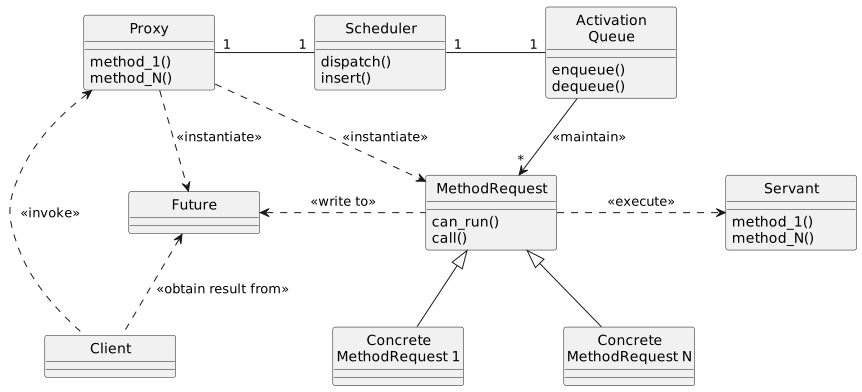
  <li><strong>Proxy</strong>: Provides an interface that clients invoke to execute a method of the active object residing in a different thread.</li>
  <li><strong>Method Request Class</strong>: Defines an interface for executing methods in the active object. It is subclassed to create concrete method request classes.</li>
  <li><strong>Activation List</strong>: The Proxy inserts created concrete method request objects into the activation list. These requests are then dequeued and executed by the thread where the active object resides.</li>
  <li><strong>Scheduler</strong>: Runs in the active object’s thread. It dequeues the queued method requests from the activation list and executes them.</li>
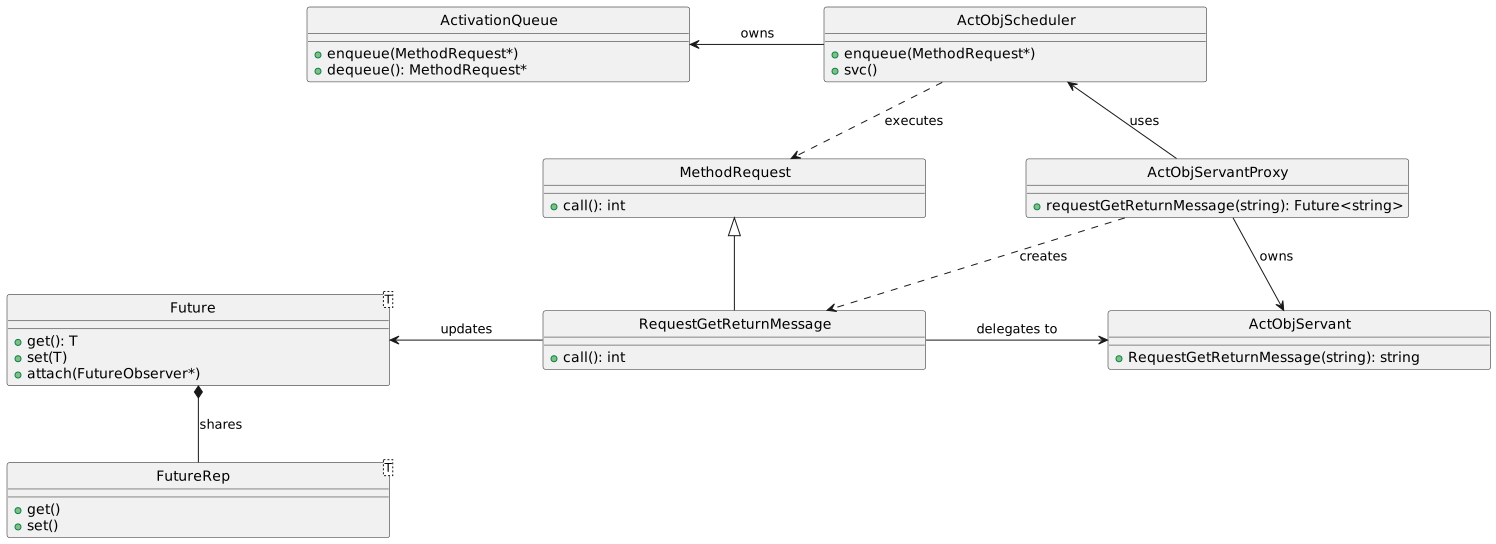
  <li><strong>Servant</strong>: Defines the behavior and state modeled by an active object. The methods implemented by the servant correspond to the interface provided by the proxy. Its methods are executed by the scheduler in the thread where the scheduler runs.</li>
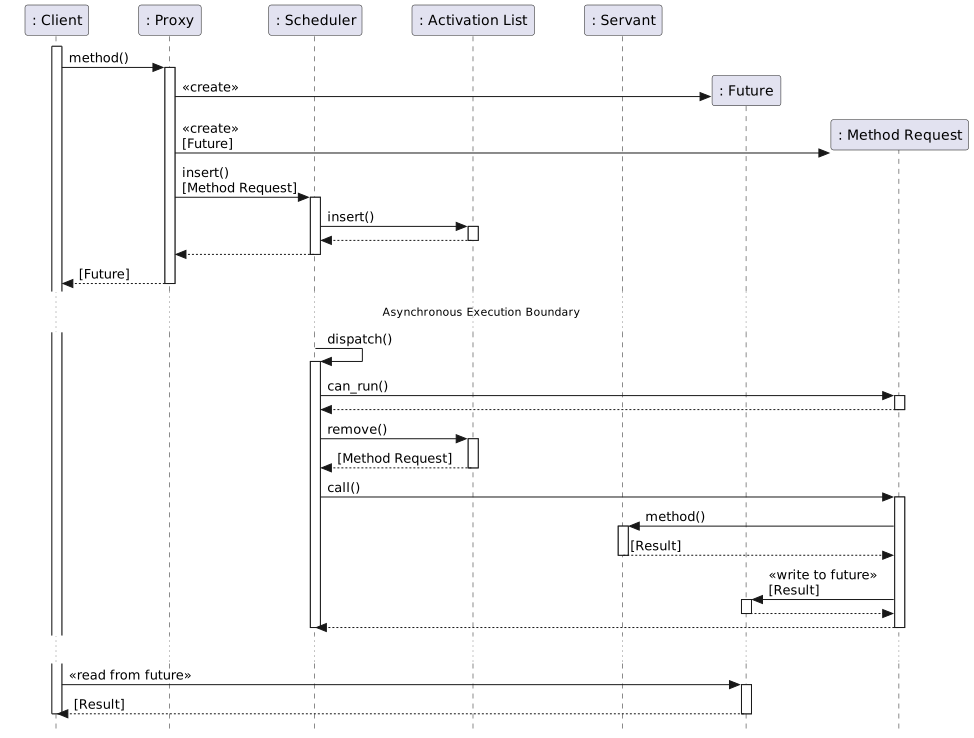
  <li><strong>Future</strong>: The client receives a Future object after invoking the interface. The client obtains the result of the method invocation via the Future once the servant finishes executing the method. The client can retrieve the result data by a synchronous wait (blocked wait) or an asynchronous callback.</li>
</ul>

<h4 id="class-diagram">Class diagram</h4>

<!-- [AI Note]: The diagram below is generated from /_files/uml/plantUml/active_object pattern_class_diagram.puml -->
<p><img src="/assets/images/uml/plantUml/active_object pattern_class_diagram.svg" alt="Reactor PlantUML Diagram" width="100%" /></p>

<h4 id="dynamic">Dynamic</h4>

<!-- [AI Note]: The diagram below is generated from /_files/uml/plantUml/active_object pattern_sequence_diagram.puml -->
<p><img src="/assets/images/uml/plantUml/active_object pattern_sequence_diagram.svg" alt="Reactor PlantUML Diagram" width="100%" /></p>

<h2 id="simplified-version-of-implementation">Simplified version of Implementation</h2>

<p>This simplified <strong>Active Object pattern</strong> implementation and example application were created to better understand how the pattern works and how it is designed.</p>

<p>The source code is available at <a href="https://github.com/yjung93/study_ACE_design_pattern">https://github.com/yjung93/study_ACE_design_pattern</a></p>

<h3 id="design-choices">Design Choices</h3>
<p>This version keeps the core architectural ideas from ACE while intentionally skipping production-level complexity. For example, unlike the full ACE implementation which applies priority when executing methods in the active list, this version uses a simple FIFO strategy for executing methods.</p>

<p>The following frameworks are used as infrastructure for this implementation:</p>
<ul>
  <li><a href="/design%20pattern%20-%20ace%20framework/post-reactor/">Reactor framework</a></li>
  <li><a href="/design%20pattern%20-%20ace%20framework/post-halfsync-halfasync/">Task framework</a></li>
</ul>

<h3 id="component-mapping">Component Mapping</h3>
<p>To implement this pattern, I mapped the standard Active Object components to the following C++ classes:</p>

<table>
  <thead>
    <tr>
      <th style="text-align: left">Pattern Role</th>
      <th style="text-align: left">My Implementation Class</th>
    </tr>
  </thead>
  <tbody>
    <tr>
      <td style="text-align: left"><strong>Proxy</strong></td>
      <td style="text-align: left"><code class="language-plaintext highlighter-rouge">ActObjServantProxy</code></td>
    </tr>
    <tr>
      <td style="text-align: left"><strong>Scheduler</strong></td>
      <td style="text-align: left"><code class="language-plaintext highlighter-rouge">ActObjScheduler</code></td>
    </tr>
    <tr>
      <td style="text-align: left"><strong>Servant</strong></td>
      <td style="text-align: left"><code class="language-plaintext highlighter-rouge">ActObjServant</code></td>
    </tr>
    <tr>
      <td style="text-align: left"><strong>Method Request</strong></td>
      <td style="text-align: left"><code class="language-plaintext highlighter-rouge">RequestGetReturnMessage</code> (Concrete)</td>
    </tr>
    <tr>
      <td style="text-align: left"><strong>Activation List</strong></td>
      <td style="text-align: left"><code class="language-plaintext highlighter-rouge">ActivationQueue</code></td>
    </tr>
  </tbody>
</table>

<h3 id="framework-layer">Framework Layer</h3>

<ul>
  <li><strong>Method Request Class</strong>:
    <ul>
      <li><strong>Implementation</strong>: An abstract base class.</li>
      <li><strong>Interface</strong>: Defines a pure virtual <code class="language-plaintext highlighter-rouge">call()</code> method that must be implemented by concrete request classes to execute the specific logic.</li>
    </ul>
  </li>
  <li><strong>ActivationQueue</strong>:
    <ul>
      <li><strong>Implementation</strong>: A thread-safe queue wrapper.</li>
      <li><strong>Logic</strong>: Uses standard mutexes and condition variables to safely enqueue requests from the client thread and dequeue them in the scheduler thread.</li>
    </ul>
  </li>
  <li><strong>Future</strong>:
    <ul>
      <li><strong>Implementation</strong>: A template class that holds the result of an asynchronous operation.</li>
      <li><strong>Logic</strong>: Allows the client to retrieve the result via <code class="language-plaintext highlighter-rouge">get()</code> (synchronous blocking wait) or <code class="language-plaintext highlighter-rouge">attach()</code> (asynchronous callback).</li>
    </ul>
  </li>
</ul>

<h3 id="application-layer">Application Layer</h3>
<ul>
  <li><strong>ActObjServantProxy</strong>:
    <ul>
      <li><strong>Implementation</strong>: The client-facing API.</li>
      <li><strong>Logic</strong>: Converts method calls (e.g., <code class="language-plaintext highlighter-rouge">requestGetReturnMessage</code>) into <code class="language-plaintext highlighter-rouge">MethodRequest</code> objects, enqueues them into the <code class="language-plaintext highlighter-rouge">ActObjScheduler</code>, and immediately returns a <code class="language-plaintext highlighter-rouge">Future&lt;T&gt;</code> to the client.</li>
    </ul>
  </li>
  <li><strong>ActObjScheduler</strong>:
    <ul>
      <li><strong>Implementation</strong>: Inherits from the <code class="language-plaintext highlighter-rouge">Task</code> class to manage the worker thread.</li>
      <li><strong>Logic</strong>: The <code class="language-plaintext highlighter-rouge">svc()</code> method runs the event loop, continuously dequeuing requests from the <code class="language-plaintext highlighter-rouge">ActivationQueue</code> and invoking their <code class="language-plaintext highlighter-rouge">call()</code> method.</li>
    </ul>
  </li>
  <li><strong>ActObjServant</strong>:
    <ul>
      <li><strong>Implementation</strong>: The business logic provider.</li>
      <li><strong>Logic</strong>: Contains the actual implementation of the methods (e.g., <code class="language-plaintext highlighter-rouge">RequestGetReturnMessage</code>) which are executed by the Scheduler in its thread.</li>
    </ul>
  </li>
  <li><strong>RequestGetReturnMessage</strong>:
    <ul>
      <li><strong>Implementation</strong>: A concrete implementation of <code class="language-plaintext highlighter-rouge">MethodRequest</code>.</li>
      <li><strong>Logic</strong>: In its <code class="language-plaintext highlighter-rouge">call()</code> method, it invokes the corresponding method on the <code class="language-plaintext highlighter-rouge">ActObjServant</code>, captures the return value, and sets it on the <code class="language-plaintext highlighter-rouge">Future</code> to wake up waiting clients.</li>
    </ul>
  </li>
</ul>

<h3 id="class-diagram-1">Class diagram</h3>

<!-- [AI Note]: The diagram below is generated from /_files/uml/plantUml/active_object pattern_simplified_imp_class_diagram.puml -->
<p><img src="/assets/images/uml/plantUml/active_object pattern_simplified_imp_class_diagram.svg" alt="Reactor PlantUML Diagram" width="100%" /></p>

<h3 id="sequence-diagram">Sequence diagram</h3>

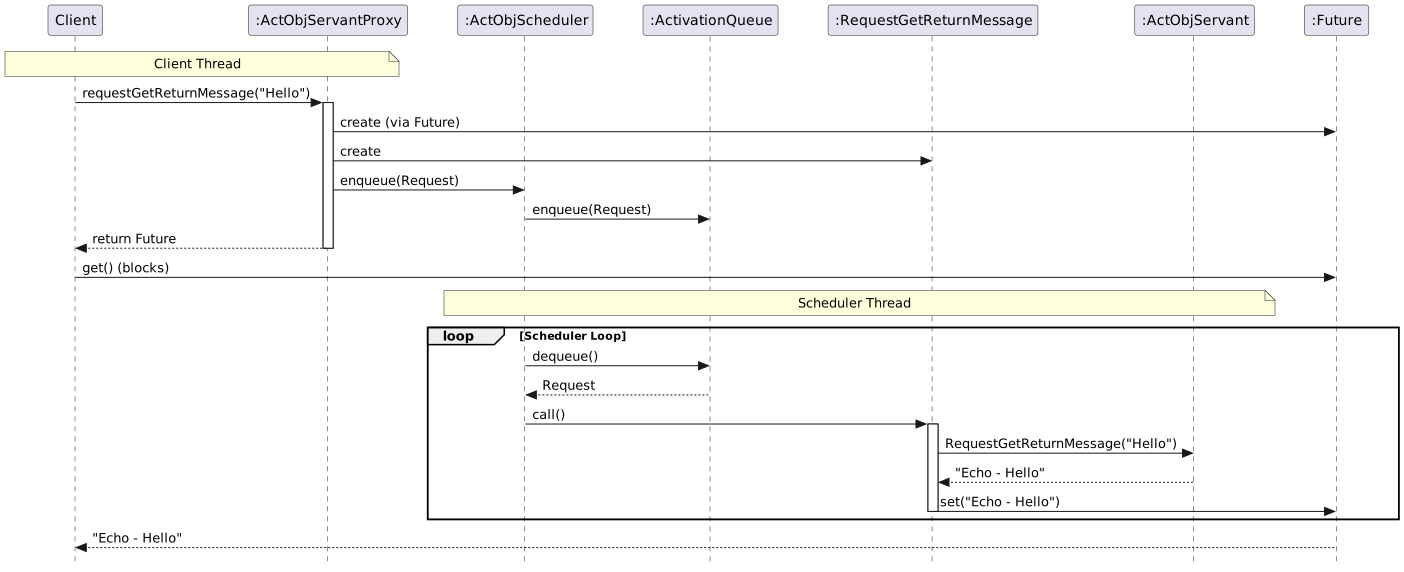
<h4 id="use-case-client-waits-synchronously">Use Case: client waits synchronously</h4>
<!-- [AI Note]: The diagram below is generated from /_files/uml/plantUml/active_object pattern_simplified_imp_dynamic_sync.puml -->
<p><img src="/assets/images/uml/plantUml/active_object pattern_simplified_imp_dynamic_sync.svg" alt="Reactor PlantUML Diagram" width="100%" /></p>

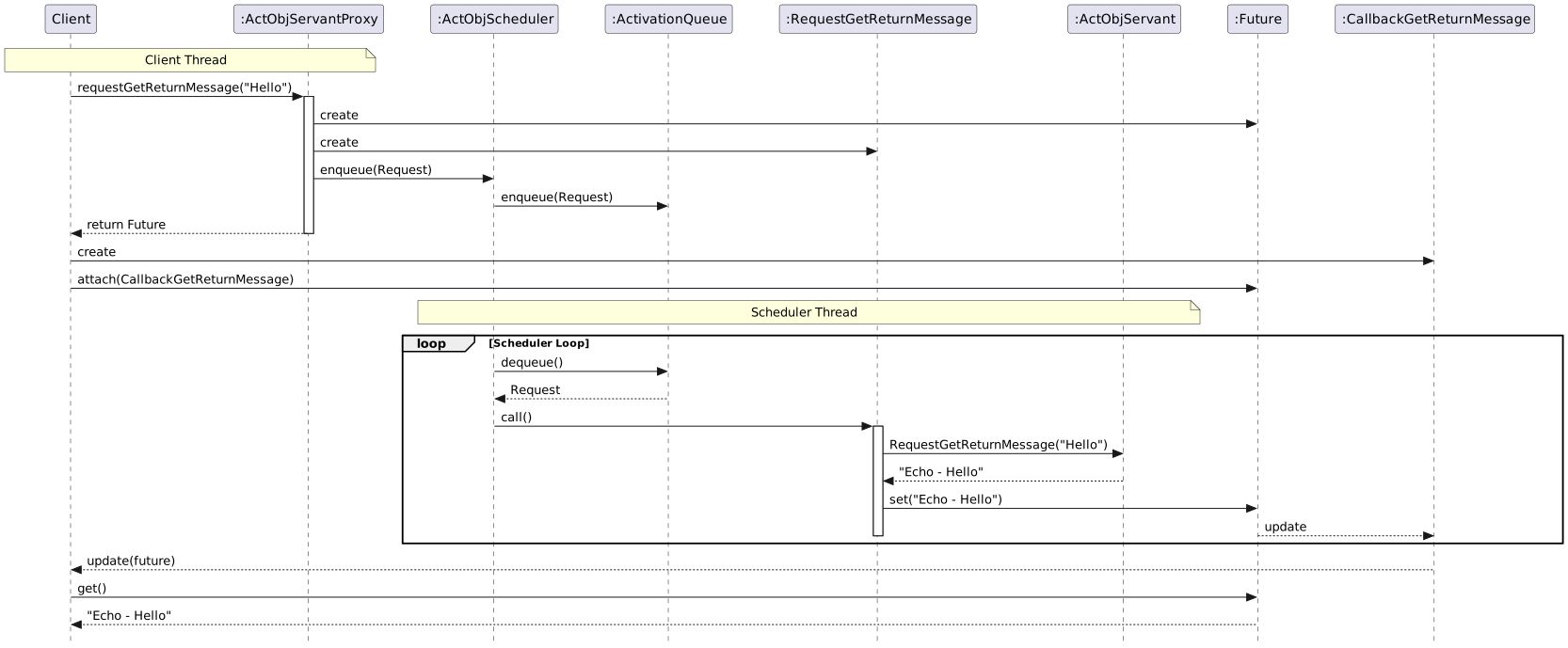
<h4 id="use-case-client-is-triggered-by-callback-asynchronously">Use Case: Client is triggered by callback asynchronously.</h4>
<!-- [AI Note]: The diagram below is generated from /_files/uml/plantUml/active_object pattern_simplified_imp_dynamic_async.puml -->
<p><img src="/assets/images/uml/plantUml/active_object pattern_simplified_imp_dynamic_async.svg" alt="Reactor PlantUML Diagram" width="100%" /></p>

<h3 id="directory-and-file-structure">Directory and file structure</h3>
<p>Related source files:</p>

<div class="language-bash highlighter-rouge"><div class="highlight"><pre class="highlight"><code>├── applications
│   ├── example_active_object
│   │   ├── ActObjAcceptor.cpp
│   │   ├── ActObjAcceptor.hpp
│   │   ├── ActObjClient.cpp
│   │   ├── ActObjClient.hpp
│   │   ├── ActObjMain.cpp
│   │   ├── ActObjMain.hpp
│   │   ├── ActObjMethodCallback.cpp
│   │   ├── ActObjMethodCallback.hpp
│   │   ├── ActObjMethodRequests.cpp
│   │   ├── ActObjMethodRequests.hpp
│   │   ├── ActObjScheduler.cpp
│   │   ├── ActObjScheduler.hpp
│   │   ├── ActObjServant.cpp
│   │   ├── ActObjServant.hpp
│   │   ├── ActObjServantProxy.cpp
│   │   ├── ActObjServantProxy.hpp
│   │   ├── MainClient.cpp
│   │   └── MainServer.cpp
├── framework
│   ├── active_object
│   │   └── 1_0
│   │       ├── ActivationQueue.cpp
│   │       ├── ActivationQueue.hpp
│   │       ├── Future.cpp
│   │       ├── Future.hpp
│   │       ├── MethodRequest.cpp
│   │       └── MethodRequest.hpp
│   └── task
│       └── 1_0
│           ├── Task.cpp
│           └── Task.hpp

</code></pre></div></div>]]></content><author><name>Jake Yoo</name></author><category term="Design Pattern - ACE Framework" /><category term="Active Object" /><summary type="html"><![CDATA[Table of Contents Overview Active Object pattern [POSA2] Background Solution Structure Class diagram Dynamic Simplified version of Implementation Design Choices Component Mapping Framework Layer Application Layer Class diagram Sequence diagram Use Case: client waits synchronously Use Case: Client is triggered by callback asynchronously. Directory and file structure]]></summary></entry><entry><title type="html">HalfSync/HalfAsync Pattern</title><link href="https://yjung93.github.io/design%20pattern%20-%20ace%20framework/post-halfsync-halfasync/" rel="alternate" type="text/html" title="HalfSync/HalfAsync Pattern" /><published>2025-11-07T00:00:00+00:00</published><updated>2025-11-07T00:00:00+00:00</updated><id>https://yjung93.github.io/design%20pattern%20-%20ace%20framework/post-halfsync-halfasync</id><content type="html" xml:base="https://yjung93.github.io/design%20pattern%20-%20ace%20framework/post-halfsync-halfasync/"><![CDATA[<p><strong>Table of Contents</strong></p>
<ul>
  <li><a href="#overview">Overview</a></li>
  <li><a href="#half-synchalf-async-pattern-posa2">Half-Sync/Half-Async pattern [POSA2]</a>
    <ul>
      <li><a href="#background">Background</a></li>
      <li><a href="#solution">Solution</a></li>
      <li><a href="#structure">Structure</a></li>
    </ul>
  </li>
  <li><a href="#simplified-implementation">Simplified implementation</a>
    <ul>
      <li><a href="#class-diagram">class diagram</a></li>
      <li><a href="#sequence-diagram">sequence diagram</a></li>
    </ul>
  </li>
  <li><a href="#example-application-using-simplified-task-framework">Example Application using simplified Task framework</a>
    <ul>
      <li><a href="#server-application">Server application</a>
        <ul>
          <li><a href="#accepror">Accepror</a></li>
          <li><a href="#asyncservice">AsyncService</a></li>
          <li><a href="#syncservice">SyncService</a></li>
        </ul>
      </li>
      <li><a href="#class-diagram-1">class diagram</a></li>
      <li><a href="#sequence-diagram-1">Sequence Diagram</a>
        <ul>
          <li><a href="#interoperation-between-async-and-sync-service-layer">Interoperation between Async and Sync service layer</a></li>
          <li><a href="#life-cycle-of-asyncsync-service-component">Life Cycle of Async/Sync Service component</a></li>
        </ul>
      </li>
      <li><a href="#directory-and-file-structure">Directory and file structure</a></li>
    </ul>
  </li>
</ul>

<h2 id="overview">Overview</h2>

<p>This post covers the following topics:</p>
<ul>
  <li>The <strong>Half-Sync/Half-Async pattern</strong>  for decoupling asynchronous operations from synchronous processing.</li>
  <li>A <strong>simplified</strong> implementation inspired by the <a href="https://www.dre.vanderbilt.edu/~schmidt/ACE.html">Adaptive Communication Environment (ACE)</a>. The source code is available at <a href="https://github.com/yjung93/study_ACE_design_pattern">https://github.com/yjung93/study_ACE_design_pattern</a></li>
</ul>

<h2 id="half-synchalf-async-pattern-posa2">Half-Sync/Half-Async pattern [<a href="/references/post-references">POSA2</a>]</h2>

<p>The <strong>Half-Sync/Half-Async pattern</strong> simplifies programming in concurrent systems by decoupling asynchronous and synchronous service processing without reducing performance.</p>

<h3 id="background">Background</h3>
<p>Concurrent software systems are often designed with a mixture of synchronous and asynchronous processing services.</p>
<ul>
  <li>An asynchronous-processing-based design is efficient for handling time-critical events such as hardware interrupts or software signal events.</li>
  <li>A synchronous-processing-based design, in contrast, simplifies the programming effort.</li>
</ul>

<p>To achieve both programming simplicity and high performance, we need to combine these two approaches in the software architecture.</p>

<h3 id="solution">Solution</h3>
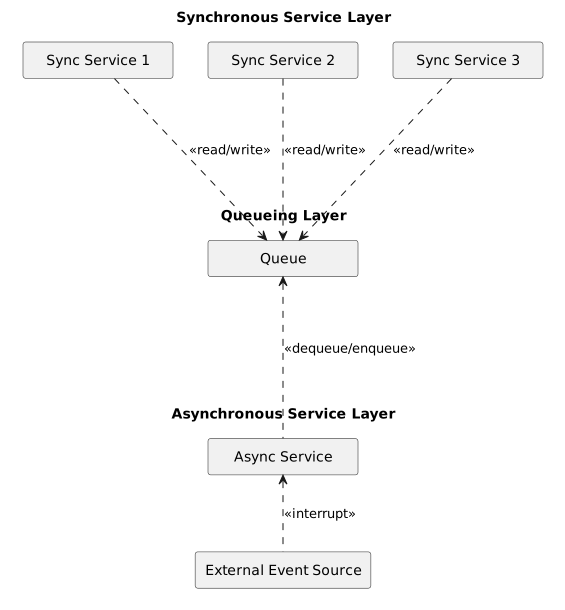
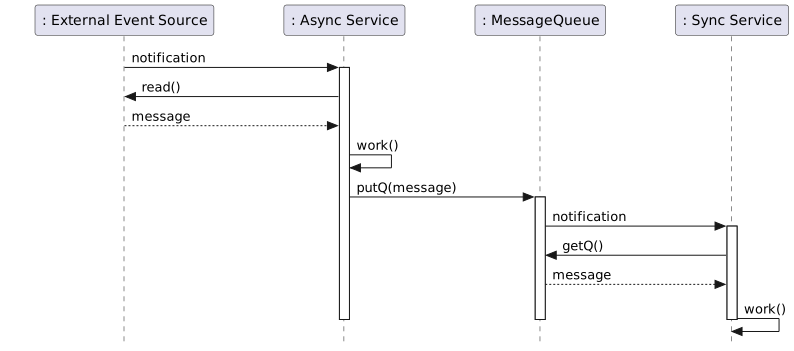
<p>Decompose the system into two layers, a synchronous service layer and an asynchronous service layer, each running in a different thread. Add a message-queue layer between them so that the two layers communicate via the queue.</p>

<ul>
  <li>The asynchronous service layer acts as a time-critical, low-level layer. It wakes up on events such as hardware interrupts or software signals from the underlying system and forwards the corresponding messages to the synchronous service layer via the message queue.</li>
  <li>The synchronous service layer implements higher-level, long-duration application services such as database queries or file reading/writing on a separate, independent thread.</li>
</ul>

<h3 id="structure">Structure</h3>
<p>This pattern is organized into three layers:</p>

<ul>
  <li><strong>Asynchronous (or reactive) service layer</strong></li>
  <li><strong>Synchronous service layer</strong></li>
  <li><strong>Message-queue layer between async and sync layers</strong></li>
</ul>

<!-- [AI Note]: The diagram below is generated from /_files/uml/plantUml/halfsync_halfasync_structure.puml -->
<p><img src="/assets/images/uml/plantUml/halfsync_halfasync_structure.svg" alt="Reactor PlantUML Diagram" width="70%" /></p>

<h2 id="simplified-implementation">Simplified implementation</h2>

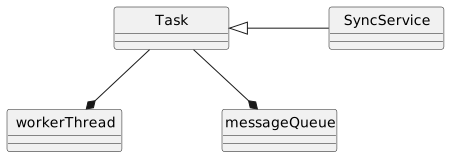
<p>The design pattern is applied to the <strong>Task Framework</strong> [<a href="/references/post-references">SH03</a>] of ACE.</p>

<p>The simplified <strong>Task framework</strong> is implemented to better understand how the pattern works and how it fits into a layered design.</p>

<p>This version keeps the core architectural ideas from ACE while intentionally skipping production-level complexity.</p>

<p>The source code is available at <a href="https://github.com/yjung93/study_ACE_design_pattern">https://github.com/yjung93/study_ACE_design_pattern</a>.</p>

<p>The framework consists of the following components:</p>
<ul>
  <li><strong>Task class</strong>
    <ul>
      <li>Base class of synchronous services. It embeds a message queue and a worker thread, enabling the concrete class to perform services in the synchronous service layer.</li>
    </ul>
  </li>
  <li><strong>Message Queue</strong>
    <ul>
      <li>The asynchronous service layer passes messages through this queue to the synchronous service layer.</li>
    </ul>
  </li>
  <li><strong>Worker Thread</strong>
    <ul>
      <li>The thread on which the synchronous service runs. It wakes up when it receives a message from the asynchronous service layer and performs the synchronous application service.</li>
    </ul>
  </li>
  <li><strong>Sync service</strong>
    <ul>
      <li>Concrete subclass of <code class="language-plaintext highlighter-rouge">Task</code>. It receives messages from the asynchronous service layer and performs synchronous application services.</li>
    </ul>
  </li>
</ul>

<h3 id="class-diagram">class diagram</h3>
<!-- [AI Note]: The diagram below is generated from /_files/uml/plantUml/example_halfsync_halfasync_framework_class.puml -->
<p><img src="/assets/images/uml/plantUml/example_halfsync_halfasync_framework_class.svg" alt="Reactor PlantUML Diagram" width="60%" /></p>

<h3 id="sequence-diagram">sequence diagram</h3>

<!-- [AI Note]: The diagram below is generated from /_files/uml/plantUml/example_halfsync_halfasync_framework_sequence.puml -->
<p><img src="/assets/images/uml/plantUml/example_halfsync_halfasync_framework_sequence.svg" alt="Reactor PlantUML Diagram" width="100%" /></p>

<h2 id="example-application-using-simplified-task-framework">Example Application using simplified Task framework</h2>

<h3 id="server-application">Server application</h3>
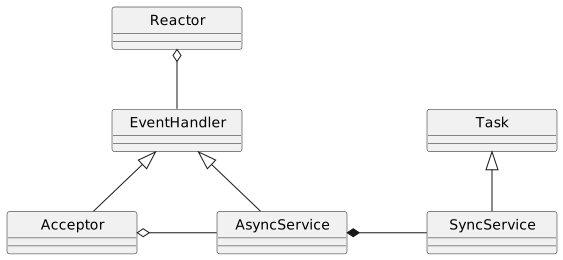
<ul>
  <li>Demonstration server that waits for client connections, accepts them, and echoes messages received from clients.</li>
  <li>Consists of <code class="language-plaintext highlighter-rouge">Acceptor</code> and <code class="language-plaintext highlighter-rouge">AsyncService</code> running on the main thread, and <code class="language-plaintext highlighter-rouge">SyncService</code> running on a separate thread.</li>
</ul>

<h4 id="accepror">Accepror</h4>
<ul>
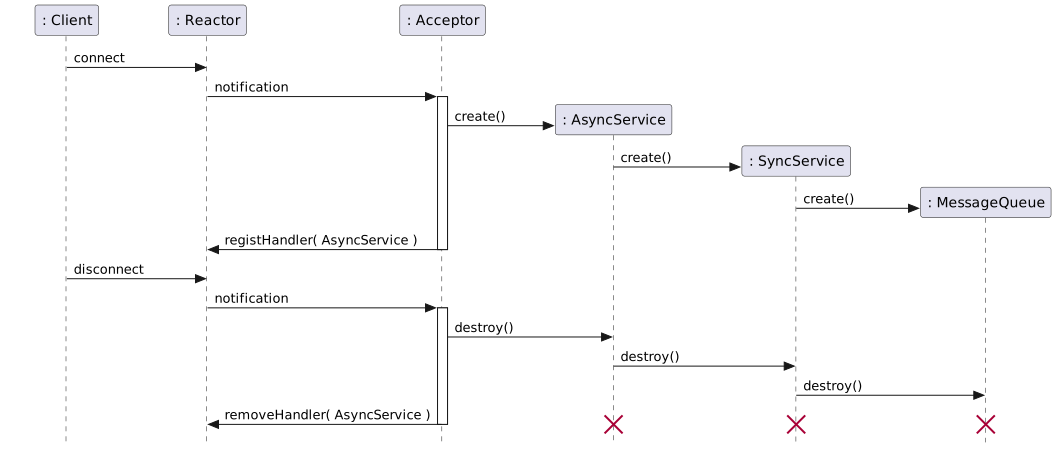
  <li>Accepts incoming connections and creates <code class="language-plaintext highlighter-rouge">AsyncService</code> and <code class="language-plaintext highlighter-rouge">SyncService</code> objects when a connection is established.</li>
  <li>Registers the <code class="language-plaintext highlighter-rouge">AsyncService</code> object with the <code class="language-plaintext highlighter-rouge">Reactor</code> so it can receive callback events when a message arrives from a client.</li>
</ul>

<h4 id="asyncservice">AsyncService</h4>
<ul>
  <li>Receives external events from the <code class="language-plaintext highlighter-rouge">Reactor</code> and forwards the corresponding messages to <code class="language-plaintext highlighter-rouge">SyncService</code> via the message queue.</li>
</ul>

<h4 id="syncservice">SyncService</h4>
<ul>
  <li>Concrete subclass of the <code class="language-plaintext highlighter-rouge">Task</code> class.</li>
  <li>Processes synchronous services on a separate, independent thread.</li>
</ul>

<h3 id="class-diagram-1">class diagram</h3>

<!-- [AI Note]: The diagram below is generated from /_files/uml/plantUml/example_halfsync_halfasync_application_class.puml -->
<p><img src="/assets/images/uml/plantUml/example_halfsync_halfasync_application_class.svg" alt="Reactor PlantUML Diagram" width="70%" /></p>

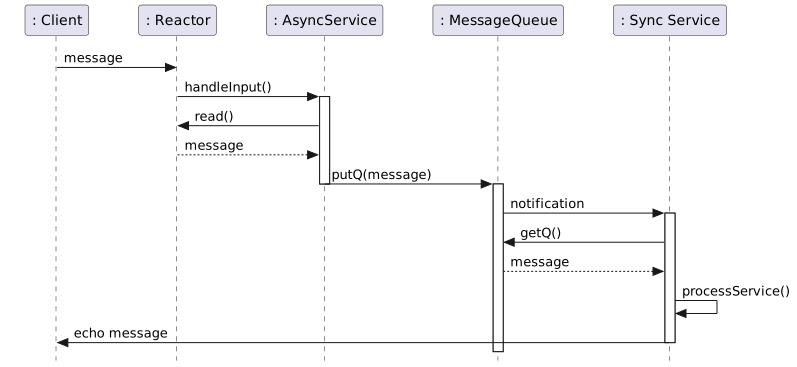
<h3 id="sequence-diagram-1">Sequence Diagram</h3>

<h4 id="interoperation-between-async-and-sync-service-layer">Interoperation between Async and Sync service layer</h4>

<!-- [AI Note]: The diagram below is generated from /_files/uml/plantUml/example_halfsync_halfasync_application_interoperation_async_sync.puml -->
<p><img src="/assets/images/uml/plantUml/example_halfsync_halfasync_application_interoperation_async_sync.svg" alt="Reactor PlantUML Diagram" width="100%" /></p>

<h4 id="life-cycle-of-asyncsync-service-component">Life Cycle of Async/Sync Service component</h4>

<!-- [AI Note]: The diagram below is generated from /_files/uml/plantUml/example_halfsync_halfasync_application_lifecycle_async_sync.puml -->
<p><img src="/assets/images/uml/plantUml/example_halfsync_halfasync_application_lifecycle_async_sync.svg" alt="Reactor PlantUML Diagram" width="100%" /></p>

<h3 id="directory-and-file-structure">Directory and file structure</h3>
<p>Related source files:</p>

<div class="language-bash highlighter-rouge"><div class="highlight"><pre class="highlight"><code>├── applications
│   ├── example_half-sync_half-async
│   │   ├── Acceptor.cpp
│   │   ├── Acceptor.hpp
│   │   ├── AsyncService.cpp
│   │   ├── AsyncService.hpp
│   │   ├── MainClient.cpp
│   │   ├── MainServer.cpp
│   │   ├── SyncService.cpp
│   │   └── SyncService.hpp
├── framework
│   ├── reactor
│   │   └── 1_0
│   │       ├── EventHandler.cpp
│   │       ├── EventHandler.hpp
│   │       ├── Reactor.cpp
│   │       └── Reactor.hpp
│   └── task
│       └── 1_0
│           ├── Task.cpp
│           └── Task.hpp

</code></pre></div></div>]]></content><author><name>Jake Yoo</name></author><category term="Design Pattern - ACE Framework" /><category term="HalfSync/HalfAsync" /><summary type="html"><![CDATA[Table of Contents Overview Half-Sync/Half-Async pattern [POSA2] Background Solution Structure Simplified implementation class diagram sequence diagram Example Application using simplified Task framework Server application Accepror AsyncService SyncService class diagram Sequence Diagram Interoperation between Async and Sync service layer Life Cycle of Async/Sync Service component Directory and file structure]]></summary></entry><entry><title type="html">Acceptor-Connector Pattern</title><link href="https://yjung93.github.io/design%20pattern%20-%20ace%20framework/post-acceptor-connector/" rel="alternate" type="text/html" title="Acceptor-Connector Pattern" /><published>2025-08-10T00:00:00+00:00</published><updated>2025-08-10T00:00:00+00:00</updated><id>https://yjung93.github.io/design%20pattern%20-%20ace%20framework/post-acceptor-connector</id><content type="html" xml:base="https://yjung93.github.io/design%20pattern%20-%20ace%20framework/post-acceptor-connector/"><![CDATA[<p><strong>Table of Contents</strong></p>
<ul>
  <li><a href="#overview">Overview</a></li>
  <li><a href="#simplified-acceptor-connector-framework-implementation">Simplified Acceptor-Connector framework implementation</a>
    <ul>
      <li><a href="#structure">Structure</a></li>
      <li><a href="#event-infrastructure-layer-classes">Event infrastructure layer classes</a></li>
      <li><a href="#connection-management-layer-classes">Connection management layer classes</a>
        <ul>
          <li><a href="#servicehandler">ServiceHandler</a></li>
          <li><a href="#acceptor">Acceptor</a></li>
          <li><a href="#connector">Connector</a></li>
        </ul>
      </li>
      <li><a href="#application-layer-classes">Application layer classes</a>
        <ul>
          <li><a href="#server-application">Server application</a>
            <ul>
              <li><a href="#acceptorimpl">AcceptorImpl</a></li>
              <li><a href="#inputhandler">InputHandler</a></li>
            </ul>
          </li>
          <li><a href="#client-application">Client application</a>
            <ul>
              <li><a href="#client">Client</a></li>
              <li><a href="#connectorimpl">ConnectorImpl</a></li>
              <li><a href="#outputhandler">OutputHandler</a></li>
              <li><a href="#dynamics">Dynamics</a></li>
            </ul>
          </li>
        </ul>
      </li>
      <li><a href="#directory-and-file-structure">Directory and file structure</a></li>
    </ul>
  </li>
</ul>

<h2 id="overview">Overview</h2>
<p>This post covers the following topics:</p>
<ul>
  <li>The <strong>Acceptor-Connector pattern</strong> [<a href="/references/post-references">POSA2</a>] for decoupling connection establishment and initialization from application logic.</li>
  <li>A <strong>simplified</strong> implementation inspired by the <a href="https://www.dre.vanderbilt.edu/~schmidt/ACE.html">Adaptive Communication Environment (ACE)</a>. The source code is available at <a href="https://github.com/yjung93/study_ACE_design_pattern">https://github.com/yjung93/study_ACE_design_pattern</a></li>
</ul>

<h2 id="simplified-acceptor-connector-framework-implementation">Simplified Acceptor-Connector framework implementation</h2>
<p>I built a small, learning-oriented Acceptor-Connector framework to understand how the pattern works and how it fits into a layered design.</p>

<p>This version keeps the core architectural ideas from ACE while intentionally skipping production-level complexity.</p>

<p>The source code is available at <a href="https://github.com/yjung93/study_ACE_design_pattern">https://github.com/yjung93/study_ACE_design_pattern</a></p>

<h3 id="structure">Structure</h3>
<p>The implementation is organized into three layers:</p>

<ul>
  <li><strong>Event infrastructure layer classes</strong></li>
  <li><strong>Connection management layer classes</strong></li>
  <li><strong>Application layer classes</strong></li>
</ul>

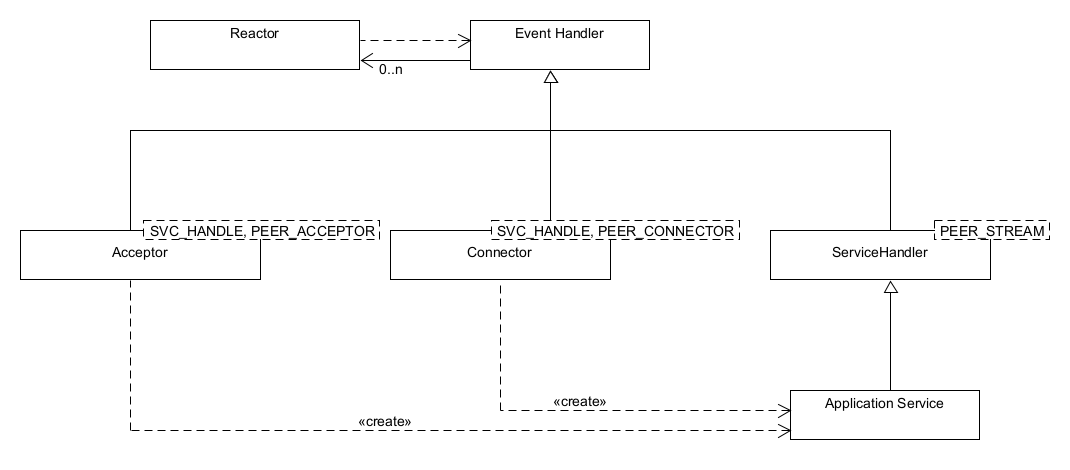
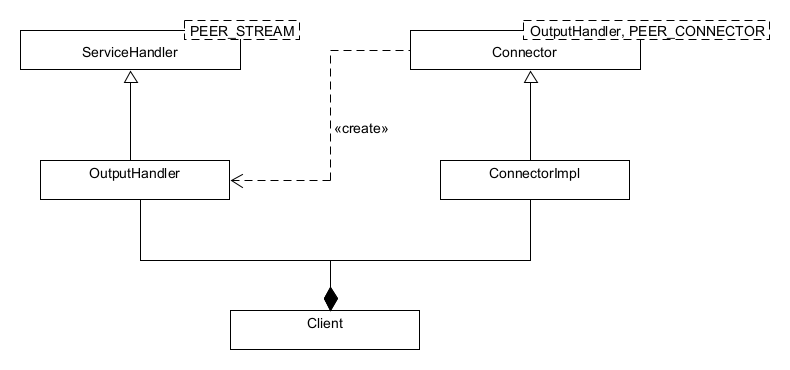
<p>The relationships between classes in this framework are shown below.<br />
<img src="/assets/images/acceptor_connector_class_diagram_v_1_1.png" alt="Class diagram — Acceptor-Connector framework (v1.1)" /></p>

<h3 id="event-infrastructure-layer-classes">Event infrastructure layer classes</h3>
<p>This simplified framework is built on top of a <strong>Reactor</strong> framework that provides event demultiplexing and dispatching. For details, see the previous post: <a href="/design%20pattern%20-%20ace%20framework/post-reactor/">Reactor Pattern</a>.</p>

<h3 id="connection-management-layer-classes">Connection management layer classes</h3>
<p>This layer provides <strong>generic, application-independent</strong> connection and initialization services. It consists of:</p>

<ul>
  <li><strong>ServiceHandler</strong></li>
  <li><strong>Acceptor</strong></li>
  <li><strong>Connector</strong></li>
</ul>

<h4 id="servicehandler">ServiceHandler</h4>
<ul>
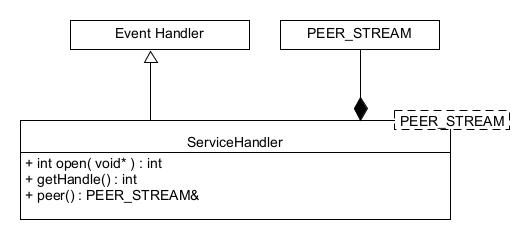
  <li>Defines the interfaces needed by an application service implementation.</li>
  <li>Concrete services typically act as a client, a server, or both in a peer-to-peer system.</li>
  <li>Created by an <strong>Acceptor</strong> or <strong>Connector</strong> when a connection is established.</li>
  <li>Provides a hook that the Acceptor/Connector calls to activate the service once the connection is ready.</li>
  <li>Exposes a <strong>transport endpoint</strong> used by the application service to communicate with its peer. The endpoint type is parameterized (template) so the OS-specific I/O implementation stays separate from application logic.</li>
</ul>

<p><img src="/assets/images/service_handler_class_diagram.png" alt="Class diagram — ServiceHandler" /></p>

<h4 id="acceptor">Acceptor</h4>
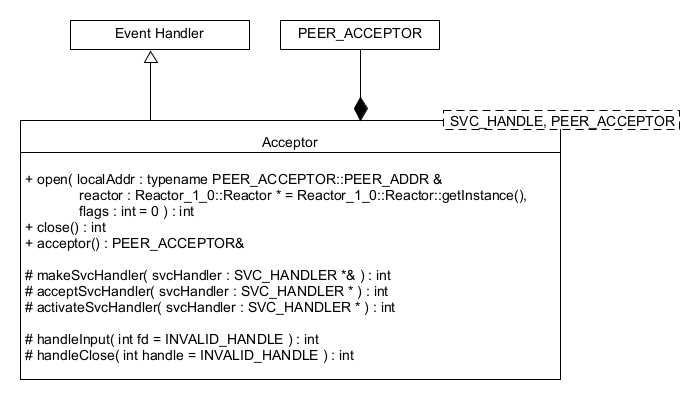
<ul>
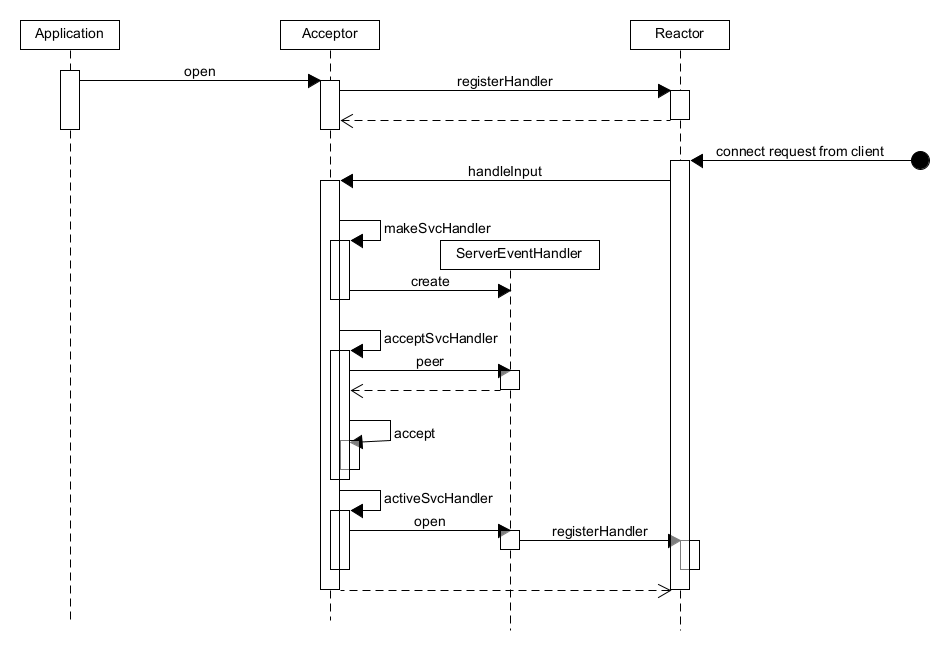
  <li><strong>Passively</strong> establishes a connected transport endpoint.</li>
  <li>Creates and initializes the associated <strong>ServiceHandler</strong> when a connection is accepted.</li>
  <li>Decouples acceptance/initialization from the ServiceHandler that runs application logic.</li>
</ul>

<p><img src="/assets/images/acceptor_class_diagram.png" alt="Class diagram — Acceptor" /></p>

<p><strong>Interaction sequence</strong><br />
<img src="/assets/images/acceptor_connection_acceptance_equence.png" alt="Sequence — connection acceptance via Acceptor" /></p>

<h4 id="connector">Connector</h4>
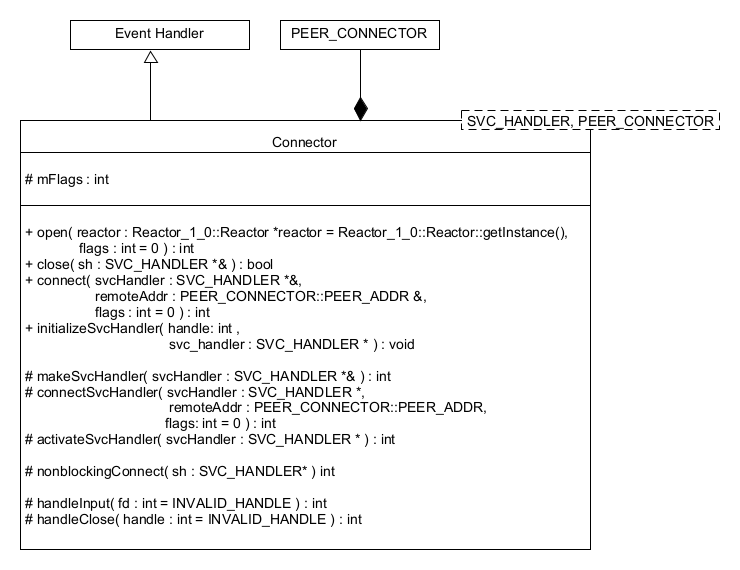
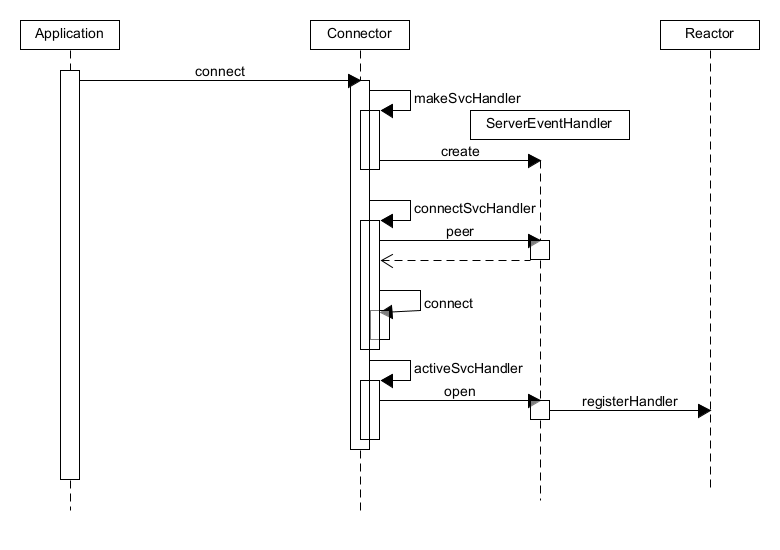
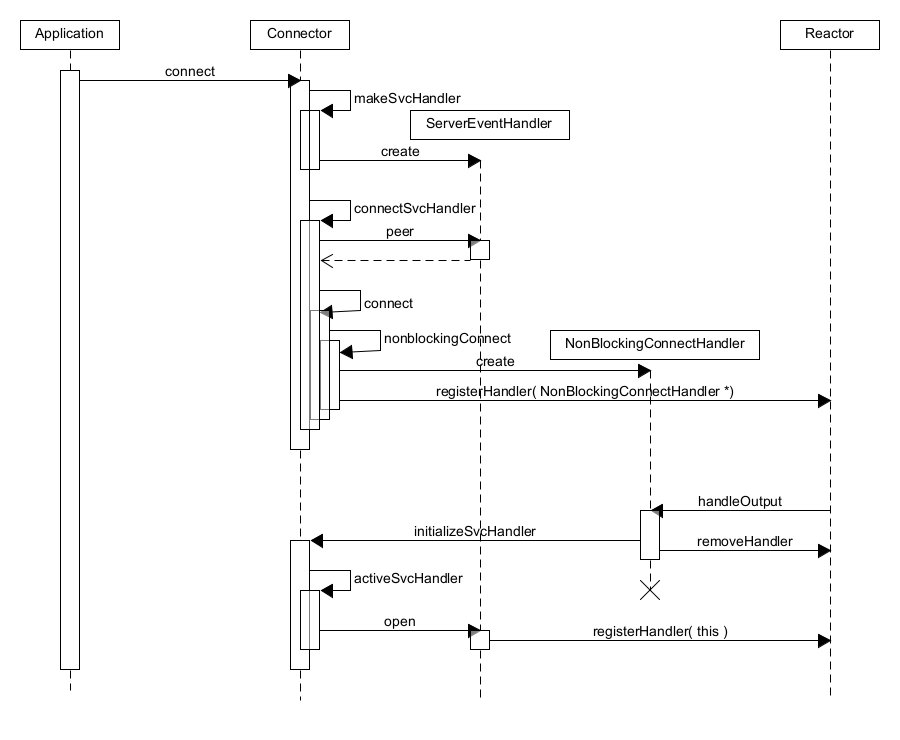
<ul>
  <li><strong>Actively</strong> establishes a connected transport endpoint.</li>
  <li>Creates and initializes the associated <strong>ServiceHandler</strong> when the connection completes.</li>
  <li>Decouples initiation/initialization from the ServiceHandler that runs application logic.</li>
  <li>Supports <strong>synchronous</strong> and <strong>asynchronous</strong> connection.</li>
</ul>

<p><img src="/assets/images/connector_class_diagram.png" alt="Class diagram — Connector" /></p>

<p><strong>Interaction sequence (synchronous)</strong><br />
<img src="/assets/images/connector_synchronous_Sequence.png" alt="Sequence — synchronous connect with Connector" /></p>

<p><strong>Interaction sequence (asynchronous)</strong><br />
<img src="/assets/images/connector_asynchronous_Sequence.png" alt="Sequence — asynchronous connect with Connector" /></p>

<h3 id="application-layer-classes">Application layer classes</h3>
<p>This layer customizes the generic strategies from the infrastructure and connection layers (via subclassing, composition, and/or template instantiation) to create concrete components that establish connections, exchange data, and implement service behavior.</p>

<h4 id="server-application">Server application</h4>
<p>Demonstration server: waits for client connections, accepts them, and echoes messages received from clients.</p>

<p><img src="/assets/images/example_acceptor_connector_server_diagram.png" alt="Component diagram — example server (Acceptor-Connector)" /></p>

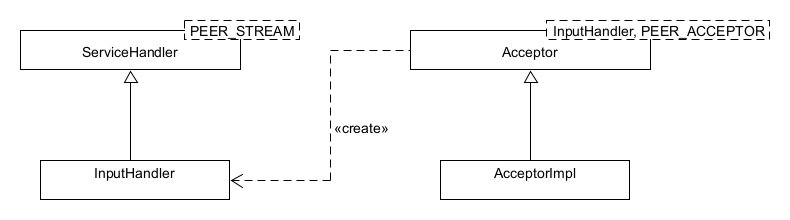
<h5 id="acceptorimpl">AcceptorImpl</h5>
<ul>
  <li>Concrete subclass of <strong>Acceptor</strong>.</li>
  <li>Plays the acceptor role by deriving from the Acceptor class.</li>
</ul>

<h5 id="inputhandler">InputHandler</h5>
<ul>
  <li>Concrete subclass of <strong>ServiceHandler</strong>.</li>
  <li>Handles client I/O and echoes back received messages.</li>
</ul>

<h4 id="client-application">Client application</h4>
<p>Demonstration client: sends user-typed messages to the server and displays the responses.</p>

<p><img src="/assets/images/example_acceptor_connector_client_diagram.png" alt="Component diagram — example client (Acceptor-Connector)" /></p>

<h5 id="client">Client</h5>
<ul>
  <li>A <strong>facade</strong> that composes a <strong>Connector</strong> and a <strong>ServiceHandler</strong>.</li>
</ul>

<h5 id="connectorimpl">ConnectorImpl</h5>
<ul>
  <li>Concrete subclass of <strong>Connector</strong>.</li>
  <li>Plays the connector role by deriving from the Connector class.</li>
</ul>

<h5 id="outputhandler">OutputHandler</h5>
<ul>
  <li>Concrete subclass of <strong>ServiceHandler</strong>.</li>
  <li>Forwards user-typed messages to the server and prints replies.</li>
</ul>

<h5 id="dynamics">Dynamics</h5>
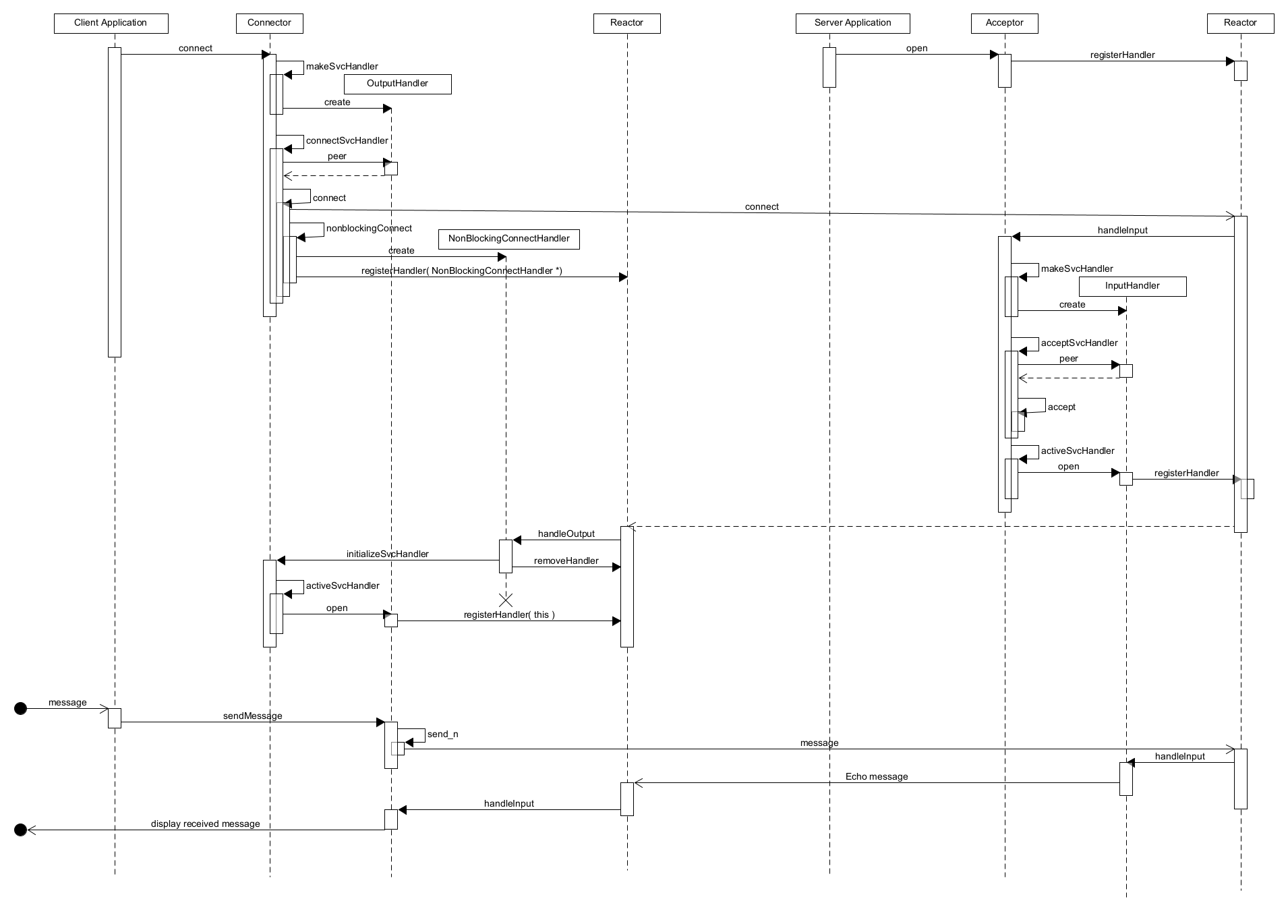
<p>This diagram shows how the client and server components interact to establish connections and run the service logic.</p>

<p><img src="/assets/images/example_acceptor_connector_Sequence.png" alt="Sequence — end-to-end example (client ↔ server)" /></p>

<h3 id="directory-and-file-structure">Directory and file structure</h3>
<p>Related source files:</p>

<div class="language-bash highlighter-rouge"><div class="highlight"><pre class="highlight"><code>├── applications
│   ├── example_acceptor_connector
│   │   ├── AcceptorImpl.cpp
│   │   ├── AcceptorImpl.hpp
│   │   ├── Client.cpp
│   │   ├── Client.hpp
│   │   ├── ConnectorImpl.cpp
│   │   ├── ConnectorImpl.hpp
│   │   ├── InputHandler.cpp
│   │   ├── InputHandler.hpp
│   │   ├── MainClient.cpp
│   │   ├── MainServer.cpp
│   │   ├── OutputHandler.cpp
│   │   └── OutputHandler.hpp
├── framework
│   ├── acceptor_connector
│   │   └── 1_0
│   │       ├── Acceptor.cpp
│   │       ├── Acceptor.hpp
│   │       ├── Config.hpp
│   │       ├── Connector.cpp
│   │       ├── Connector.hpp
│   │       ├── ServiceHandler.cpp
│   │       ├── ServiceHandler.hpp
│   │       ├── SockAcceptor.cpp
│   │       ├── SockAcceptor.hpp
│   │       ├── SockConnector.cpp
│   │       ├── SockConnector.hpp
│   │       ├── SockStream.cpp
│   │       └── SockStream.hpp

</code></pre></div></div>]]></content><author><name>Jake Yoo</name></author><category term="Design Pattern - ACE Framework" /><category term="Acceptor Connector" /><summary type="html"><![CDATA[Table of Contents Overview Simplified Acceptor-Connector framework implementation Structure Event infrastructure layer classes Connection management layer classes ServiceHandler Acceptor Connector Application layer classes Server application AcceptorImpl InputHandler Client application Client ConnectorImpl OutputHandler Dynamics Directory and file structure]]></summary></entry><entry><title type="html">Reactor Pattern</title><link href="https://yjung93.github.io/design%20pattern%20-%20ace%20framework/post-reactor/" rel="alternate" type="text/html" title="Reactor Pattern" /><published>2025-01-05T00:00:00+00:00</published><updated>2025-01-05T00:00:00+00:00</updated><id>https://yjung93.github.io/design%20pattern%20-%20ace%20framework/post-reactor</id><content type="html" xml:base="https://yjung93.github.io/design%20pattern%20-%20ace%20framework/post-reactor/"><![CDATA[<p><strong>Table of Contents</strong></p>
<ul>
  <li><a href="#overview">Overview</a></li>
  <li><a href="#reactor-pattern-posa2">Reactor Pattern [POSA2]</a>
    <ul>
      <li><a href="#background">Background</a></li>
      <li><a href="#solution">Solution</a></li>
      <li><a href="#structure">Structure</a>
        <ul>
          <li><a href="#class-diagram">Class Diagram</a></li>
          <li><a href="#dynamic">Dynamic</a></li>
        </ul>
      </li>
    </ul>
  </li>
  <li><a href="#simplified-reactor-framework-implementation">Simplified Reactor framework implementation</a>
    <ul>
      <li><a href="#structure-1">Structure</a></li>
      <li><a href="#core-classes">Core classes</a>
        <ul>
          <li><a href="#reactor">Reactor</a></li>
          <li><a href="#eventhandler">EventHandler</a></li>
        </ul>
      </li>
      <li><a href="#interaction-sequence">Interaction sequence</a></li>
      <li><a href="#example-echo-server-and-client">Example: echo server and client</a>
        <ul>
          <li><a href="#how-it-works">How it works</a></li>
        </ul>
      </li>
      <li><a href="#directory-and-file-structure">Directory and file structure</a></li>
    </ul>
  </li>
</ul>

<h2 id="overview">Overview</h2>
<p>This post covers the following topics:</p>
<ul>
  <li>The <strong>Reactor pattern</strong>  using a single event loop to demultiplex I/O events and dispatch them to registered handlers.</li>
  <li>A <strong>simplified</strong> implementation inspired by the <a href="https://www.dre.vanderbilt.edu/~schmidt/ACE.html">Adaptive Communication Environment (ACE)</a>, focusing on the essentials rather than production complexity. The source code is available at <a href="https://github.com/yjung93/study_ACE_design_pattern">https://github.com/yjung93/study_ACE_design_pattern</a></li>
</ul>

<h2 id="reactor-pattern-posa2">Reactor Pattern [<a href="/references/post-references">POSA2</a>]</h2>
<p>The Reactor pattern is a design pattern for handling service requests delivered concurrently to an application by one or more clients. It efficiently demultiplexes and dispatches events to the appropriate handlers. It provides the following benefits:</p>

<ul>
  <li><strong>Efficiency</strong>: Handles multiple events using a single thread, reducing overhead.</li>
  <li><strong>Scalability</strong>: Suitable for systems with many simultaneous connections.</li>
  <li><strong>Maintainability</strong>: Promotes modular and decoupled code design.</li>
</ul>

<h3 id="background">Background</h3>
<p>Event-driven applications in distributed systems, even if originally designed to process service requests synchronously and serially, must often process multiple service requests simultaneously. The multiple concurrent events must be demultiplexed and dispatched to the appropriate application service handlers.</p>

<p>The following forces must be resolved to address this problem:</p>
<ul>
  <li>To improve scalability and latency, the application should not block the thread when an event is triggered or exclude events from other sources.</li>
  <li>To maximize throughput, context switching, unnecessary synchronization, and data movement among CPUs should be avoided.</li>
  <li>Adding and improving services within the existing event demultiplexing and dispatching system should require minimal effort.</li>
  <li>The application’s implementation should be decoupled from the complexities of multi-threading and synchronization.</li>
</ul>

<h3 id="solution">Solution</h3>

<ul>
  <li>Synchronously wait for events from different sources.</li>
  <li>Apply a mechanism that demultiplexes and dispatches events to the application services that process them.</li>
  <li>Decouple the demultiplexing and dispatching mechanisms from the application service implementation.</li>
</ul>

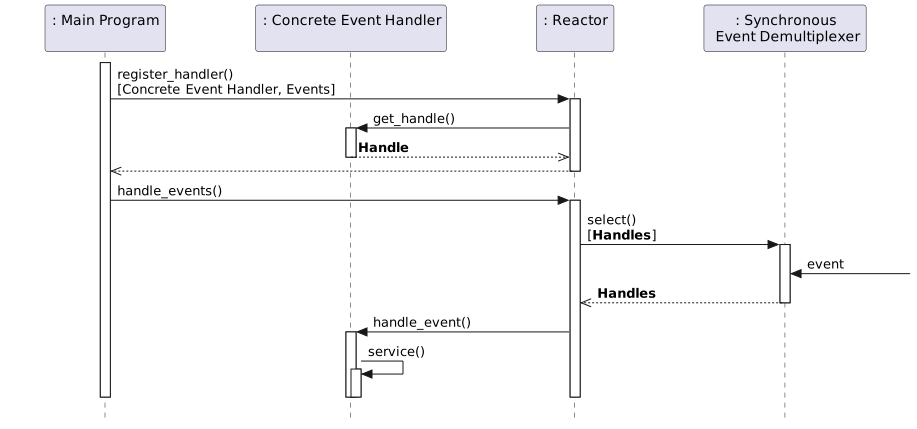
<p>In Detail:</p>
<ul>
  <li>An application implements a separate event handler for each service.</li>
  <li>Event handlers are registered with the Reactor.</li>
  <li>The Reactor uses a synchronous event demultiplexer to wait for an indication that an event has occurred.</li>
  <li>The event demultiplexer notifies the Reactor when these events occur.</li>
  <li>The Reactor dispatches the event to the associated registered event handler.</li>
  <li>The event handler performs its application service.</li>
</ul>

<h3 id="structure">Structure</h3>
<ul>
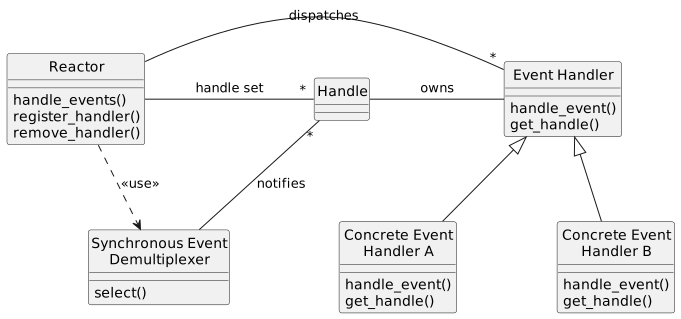
  <li><strong>Handles</strong>: Identify event sources such as network connections or open files. These are provided by the operating system.</li>
  <li><strong>Synchronous event demultiplexer</strong>: A function that waits for the occurrence of one or more events. Calling this function blocks the thread until an event occurs. The <code class="language-plaintext highlighter-rouge">select()</code> system call is a common synchronous event demultiplexer for I/O events, supported by many operating systems.</li>
  <li><strong>Event handler</strong>: Specifies an interface composed of one or more hook methods. These methods represent a set of operations that can be used to process application-specific events.</li>
  <li><strong>Concrete event handlers</strong>: Specialize the event handler and implement the application’s services.</li>
  <li><strong>Reactor</strong>: Provides an interface for applications to register or unregister their event handlers and associated handles. It runs the application’s event loop and waits for event indications on the associated handles using a synchronous demultiplexer. When an event occurs, it dispatches the event to the corresponding event handler registered by the application.</li>
</ul>

<h4 id="class-diagram">Class Diagram</h4>
<!-- [AI Note]: The diagram below is generated from /_files/uml/plantUml/reactor_design_pattern_class_diagram.puml -->
<p><img src="/assets/images/uml/plantUml/reactor_design_pattern_class_diagram.svg" alt="Reactor PlantUML Diagram" width="80%" /></p>

<h4 id="dynamic">Dynamic</h4>
<!-- [AI Note]: The diagram below is generated from /_files/uml/plantUml/reactor_design_pattern_sequence.puml -->
<p><img src="/assets/images/uml/plantUml/reactor_design_pattern_sequence.svg" alt="Reactor PlantUML Diagram" width="100%" /></p>

<h2 id="simplified-reactor-framework-implementation">Simplified Reactor framework implementation</h2>
<p>I built a small, learning-oriented framework that retains the core ideas from ACE (initiation dispatcher, event demultiplexing, handler registration) while keeping the code minimal.</p>

<p>The source code is available at <a href="https://github.com/yjung93/study_ACE_design_pattern">https://github.com/yjung93/study_ACE_design_pattern</a></p>

<h3 id="structure-1">Structure</h3>
<p>At a high level:</p>

<ul>
  <li><strong>Reactor</strong> – runs the event loop, waits for events, dispatches to handlers.</li>
  <li><strong>EventHandler</strong> – base class; concrete handlers implement the I/O logic.</li>
</ul>

<!-- [AI Note]: The diagram below is generated from /_files/uml/plantUml/reactor_class_diagram_v_1_2.puml -->
<p><img src="/assets/images/uml/plantUml/reactor_class_diagram_v_1_2.svg" alt="Reactor PlantUML Diagram" width="60%" /></p>

<h3 id="core-classes">Core classes</h3>

<h4 id="reactor">Reactor</h4>
<ul>
  <li>Maintains a registry of active handlers.</li>
  <li>Uses a synchronous demultiplexer (e.g., <code class="language-plaintext highlighter-rouge">select</code>) to wait for activity.</li>
  <li>Dispatches <code class="language-plaintext highlighter-rouge">handleInput(fd)</code> on the ready handlers.</li>
  <li>Provides <code class="language-plaintext highlighter-rouge">registerHandler()</code> and <code class="language-plaintext highlighter-rouge">removeHandler()</code> to manage the registry and lifetime.</li>
</ul>

<h4 id="eventhandler">EventHandler</h4>
<ul>
  <li>Base interface for application-specific handlers.</li>
  <li>Stores the OS handle/FD and a back-reference to the <code class="language-plaintext highlighter-rouge">Reactor</code>.</li>
  <li>Overridable <code class="language-plaintext highlighter-rouge">handleInput(fd)</code> method contains the actual I/O logic for each handler.</li>
</ul>

<h3 id="interaction-sequence">Interaction sequence</h3>
<ol>
  <li>Handlers register themselves (or are registered by an acceptor) with the <code class="language-plaintext highlighter-rouge">Reactor</code>.</li>
  <li>The <code class="language-plaintext highlighter-rouge">Reactor</code> blocks in <code class="language-plaintext highlighter-rouge">select()</code> and wakes when one or more FDs are ready.</li>
  <li>For each ready FD, the corresponding handler’s <code class="language-plaintext highlighter-rouge">handleInput(fd)</code> is invoked.</li>
  <li>Handlers may read/write, create new handlers (e.g., for new connections), or deregister on close.</li>
</ol>

<!-- [AI Note]: The diagram below is generated from /_files/uml/plantUml/reactor_Sequence.puml -->
<p><img src="/assets/images/uml/plantUml/reactor_Sequence.svg" alt="Reactor Sequence Diagram" width="80%" /></p>

<h3 id="example-echo-server-and-client">Example: echo server and client</h3>
<p>For a quick demo, I built a tiny echo server using:</p>
<ul>
  <li>An <strong>Acceptor</strong>-like handler for passive opens (creates a per-connection handler).</li>
  <li>A <strong>Server handler</strong> that reads data and echoes it back.</li>
  <li>A simple <strong>client</strong> that connects, sends user input, and prints the response.</li>
</ul>

<!-- [AI Note]: The diagram below is generated from /_files/uml/plantUml/example_reactor.puml -->
<p><img src="/assets/images/uml/plantUml/example_reactor.svg" alt="Example Reactor Diagram" width="60%" /></p>

<h4 id="how-it-works">How it works</h4>
<ul>
  <li>The Acceptor listens for new client connections. When a connection is established, it creates a ServerEventHandler and registers it with the Reactor.</li>
  <li>The Reactor monitors all registered event handlers using the select() system call and delegates events to their respective handlers.</li>
  <li>The ServerEventHandler processes client messages and echoes them back.</li>
</ul>

<!-- [AI Note]: The diagram below is generated from /_files/uml/plantUml/example_reactor_Sequence.puml -->
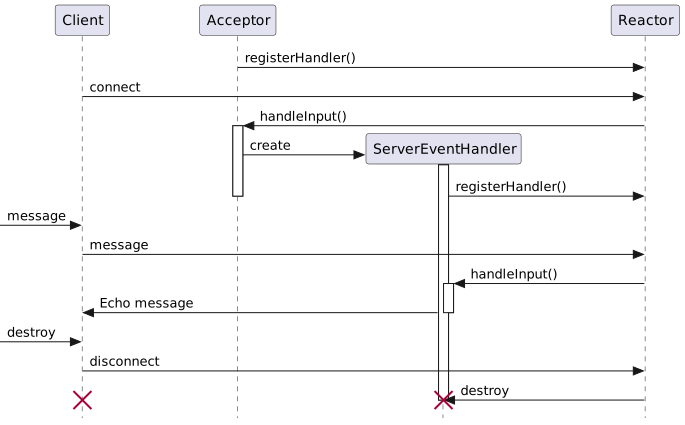
<p><img src="/assets/images/uml/plantUml/example_reactor_Sequence.svg" alt="Example Reactor Sequence Diagram" width="90%" /></p>

<p>This shows how the Reactor’s single event loop can manage multiple connections cleanly, while each handler stays focused on its own responsibility.</p>

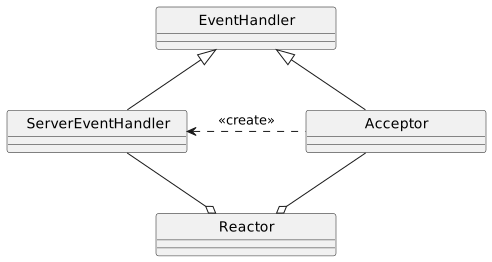
<h3 id="directory-and-file-structure">Directory and file structure</h3>
<p>Related source files for the Reactor demo:</p>

<div class="language-bash highlighter-rouge"><div class="highlight"><pre class="highlight"><code>├── applications
│   ├── example_reactor
│   │   ├── MainClient.cpp
│   │   ├── MainServer.cpp
│   │   ├── ServerEventHandler.cpp
│   │   ├── ServerEventHandler.hpp
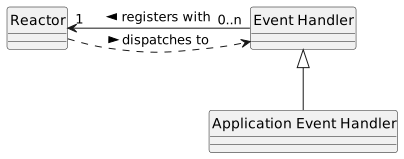
│   │   └── Acceptor.cpp / Acceptor.hpp     <span class="c"># minimal acceptor used by the server</span>
├── framework
│   └── v_1_0
│       ├── Reactor.cpp
│       ├── Reactor.hpp
│       ├── EventHandler.cpp
│       └── EventHandler.hpp
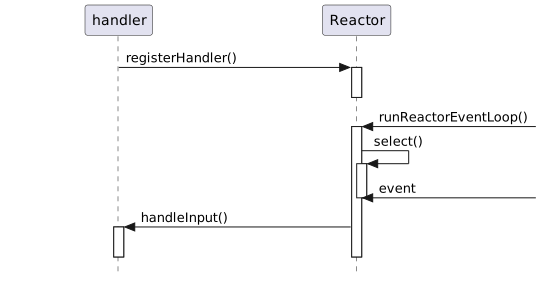
</code></pre></div></div>]]></content><author><name>Jake Yoo</name></author><category term="Design Pattern - ACE Framework" /><category term="Reactor" /><summary type="html"><![CDATA[Table of Contents Overview Reactor Pattern [POSA2] Background Solution Structure Class Diagram Dynamic Simplified Reactor framework implementation Structure Core classes Reactor EventHandler Interaction sequence Example: echo server and client How it works Directory and file structure]]></summary></entry><entry><title type="html">References</title><link href="https://yjung93.github.io/references/post-references/" rel="alternate" type="text/html" title="References" /><published>2025-01-01T00:00:00+00:00</published><updated>2025-01-01T00:00:00+00:00</updated><id>https://yjung93.github.io/references/post-references</id><content type="html" xml:base="https://yjung93.github.io/references/post-references/"><![CDATA[<h2 id="references">References</h2>

<p>[POSA2] Douglas C. Schmidt, Michael Stal, Hans Rohnert, and Frank Buschmann: Pattern-Oriented Software Architecture: Patterns for Concurrent and Networked Objects, Volume 2. Wiley &amp; Sons, New York, 2000.</p>

<p>[SH03] Douglas C. Schmidt, Stephen D. Huston: C++ Network Programming, Volume 2: Systematic Reuse with ACE and Frameworks, Addison-Wesley, 2003 .</p>]]></content><author><name>Jake Yoo</name></author><category term="References" /><category term="References" /><summary type="html"><![CDATA[References]]></summary></entry></feed>